Logo
SEO & Pricing

On-Page SEO: How to Optimize a Web Page for Search

on page seo guide
Published on: 25/07/2026
Modified: 27/07/2026

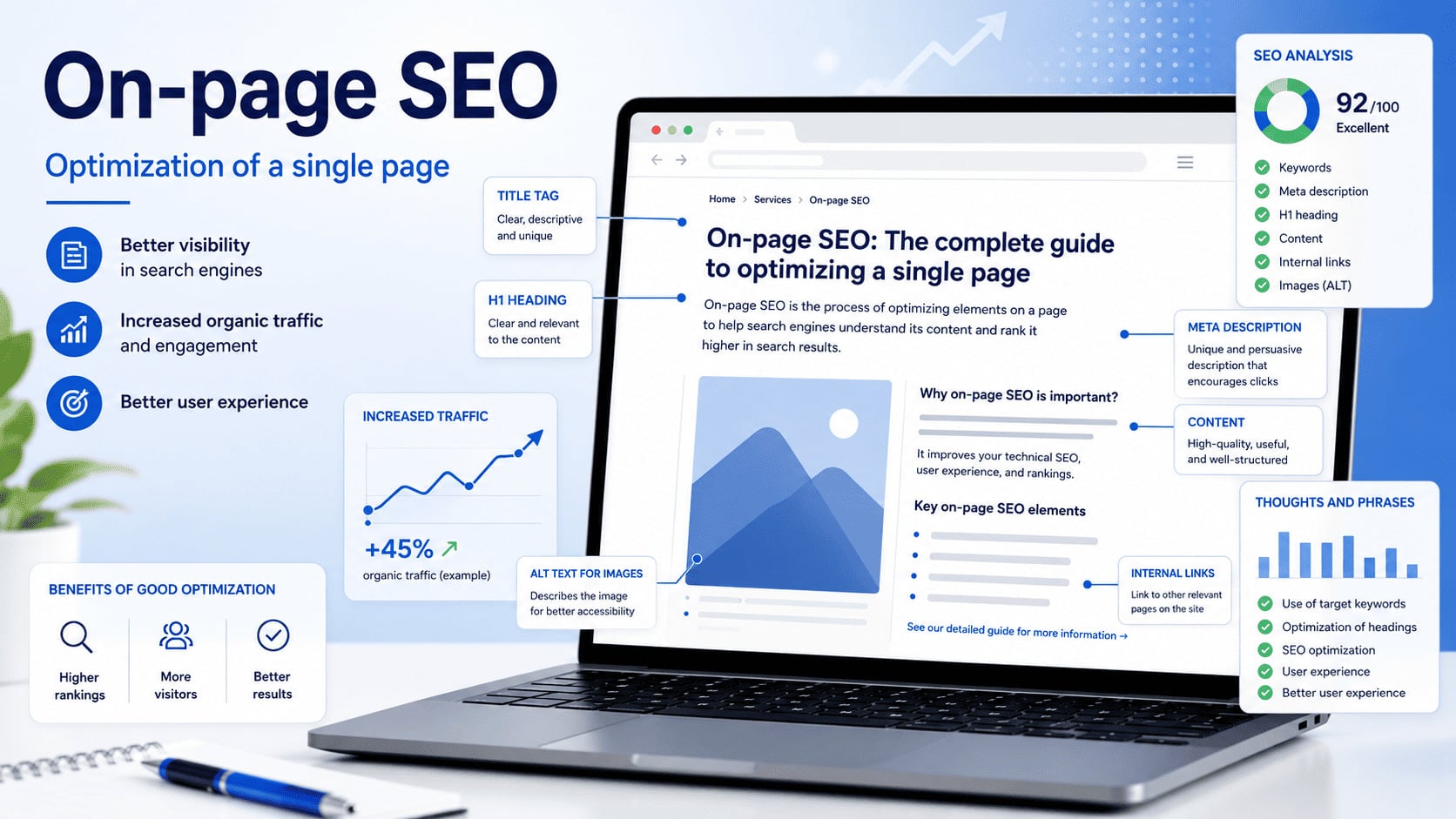
On-page SEO is the process of improving the content, organization, and HTML elements of a specific web page so it satisfies the user's search intent and communicates its purpose clearly to Google and other search systems.

It includes the page's primary purpose, main content, title tag, visible headings, meta description, internal links, images, structured data, and page-level usability.

This guide focuses on optimizing one page. It does not replace site-wide information architecture, technical crawling and indexing diagnostics, keyword-to-URL assignment, market research, or external authority work. Those disciplines belong within a complete SEO optimization program.

What Is On-Page SEO?

On-page SEO is the work performed within a specific page to make that page more useful, understandable, and relevant for a defined search need.

A well-optimized page should:

  • serve one clear primary purpose;
  • match the search intent behind its target queries;
  • answer the main question without unnecessary delay;
  • cover the supporting details a reader needs;
  • use accurate, original, and helpful information;
  • organize ideas with clear headings and readable sections;
  • connect to relevant supporting pages through useful links;
  • describe meaningful images for people and search systems;
  • present consistent titles, metadata, and visible content;
  • remain accessible, indexable, and usable on mobile devices.

On-page SEO is not a formula for placing one keyword in a fixed number of locations. It begins with understanding what the page must accomplish and ends with measuring whether the page attracts and helps the right audience.

On-Page, Technical, and Off-Page SEO Have Different Jobs

The three disciplines support one another, but they solve different problems.

DisciplinePrimary focusTypical work
On-page SEOA specific web pageSearch intent, content, title tag, H1, page-level links, images, and relevant markup
Technical SEOTechnical access and processing across the websiteCrawling, indexing, canonicalization, rendering, performance systems, and site-level technical controls
Off-page SEOAuthority and reputation beyond the websiteEditorial links, media coverage, mentions, reviews, citations, digital PR, and partnerships

A page-level edit cannot fix a site-wide crawling failure. A technically accessible page will not satisfy users if its content misses their intent. External authority cannot make an irrelevant page the best answer.

If a page is blocked, excluded from the index, or affected by a conflicting canonical, investigate the underlying problem through a proper technical SEO audit.

For editorial links, mentions, reputation, and other external signals, use the separate Off-Page SEO guide.

Start With Search Intent

on page seo search intent

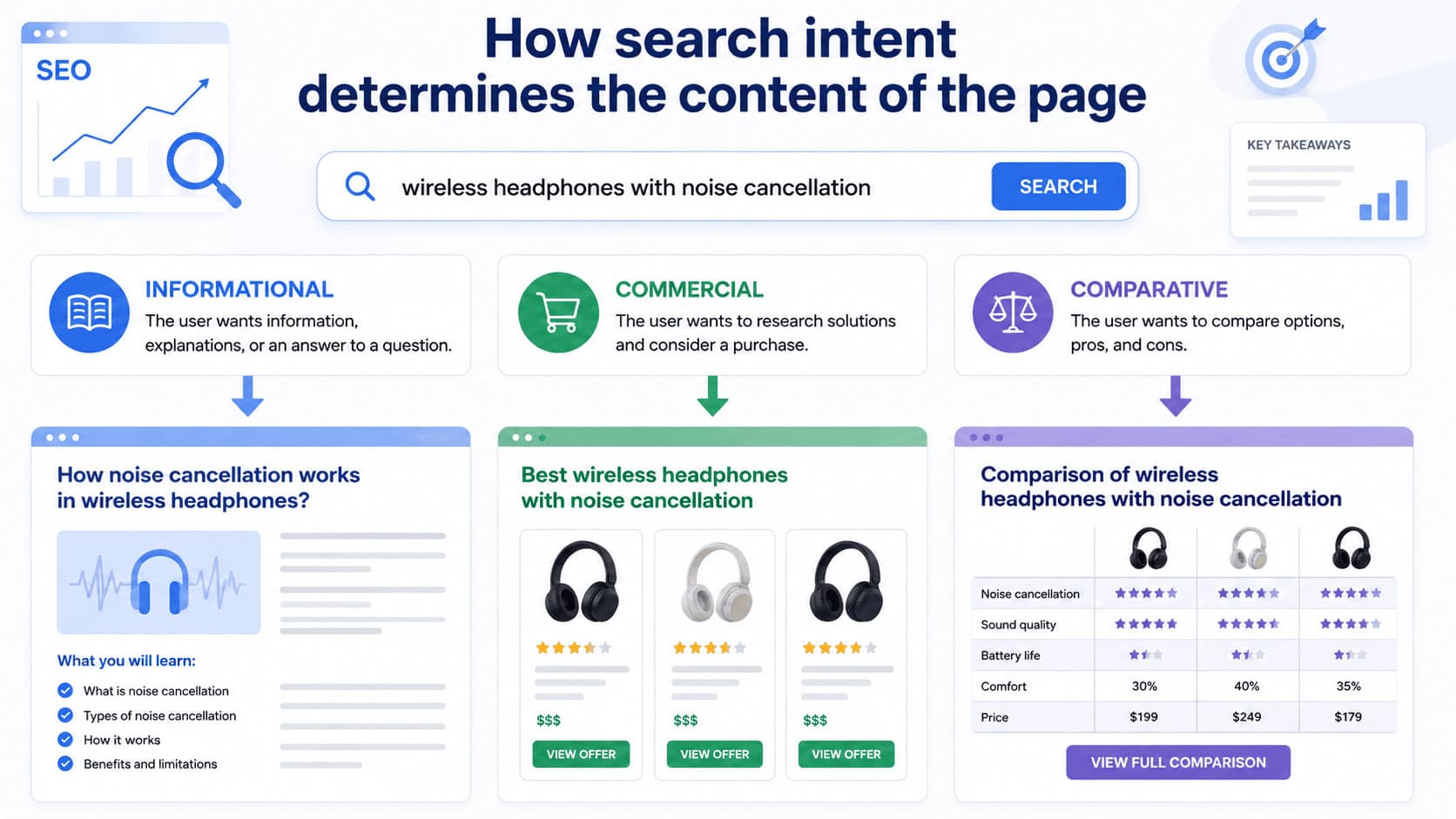
Search intent is the goal a person is trying to accomplish with a query.

The phrase "on-page SEO" usually calls for an informational guide. A query such as "SEO services pricing" suggests a commercial decision. The topics are related, but the person expects a different page type, level of detail, and next step.

Before writing or revising a page, answer these questions:

  1. What does the searcher need to learn, compare, find, or do?
  2. Which page format best supports that task?
  3. What information is necessary to complete the task?
  4. What evidence or experience would make the answer trustworthy?
  5. What should the reader be able to do after using the page?
  6. Which nearby topics require a separate page instead of another section?

Review Search Results Without Copying Them

Search results can reveal the type of content Google currently considers relevant, but they are not a template that must be copied.

Review:

  • whether leading results are guides, service pages, tools, categories, videos, or comparisons;
  • how broad or narrow their coverage is;
  • which questions appear repeatedly;
  • what information is missing or unclear;
  • whether the query has mixed intent;
  • whether freshness, location, product availability, or expertise changes the expected answer.

Then decide how your page can be more useful through original examples, direct experience, stronger evidence, clearer explanations, better organization, or current information.

Repeating the same headings used by competing pages does not create a distinctive resource. Search intent identifies the job to be done. Your content still needs its own reason to exist.

Define One Primary Page Purpose

A page can answer several related questions, but it should have one recognizable primary purpose.

For an on-page SEO guide, relevant supporting concepts include:

  • search intent;
  • title tags and title links;
  • H1 and section headings;
  • content quality and completeness;
  • natural use of terminology;
  • page-level internal links;
  • images and alternative text;
  • meta descriptions and snippets;
  • structured data;
  • author and update information;
  • indexability and page experience;
  • measurement in Search Console.

These are supporting concepts, not a list of phrases that must be inserted at a particular density.

Terms such as "LSI keywords" are often used to imply that a writer must add a secret list of related words. That is not a useful model for modern content. Use the terminology needed to explain the subject accurately and answer the reader's real questions.

For definitions of specialized SEO concepts, use the SEO glossary.

Keep Distinct Intent on Distinct Pages

A single URL should not attempt to be an informational tutorial, a complete technical audit manual, a service landing page, and a news feed at the same time.

When separate pages already own distinct tasks:

  • keep this page focused on page-level optimization;
  • use the commercial page for service evaluation and pricing;
  • use the technical resource for site-wide crawling and indexing problems;
  • use the off-page resource for external authority;
  • link to the relevant destination where a reader needs the next level of detail.

This protects clarity for the user without expanding one article into every adjacent SEO topic.

Create Helpful Main Content

Helpful content enables a reader to understand a subject, make a decision, or complete a task.

Word count alone does not measure usefulness. A narrow question may need a short answer. A complex task may require definitions, examples, constraints, and a detailed process.

Strong main content usually includes:

  • a direct answer near the beginning;
  • enough context to understand why the answer applies;
  • a logical sequence from basic concepts to action;
  • concrete examples;
  • important limitations and exceptions;
  • first-hand experience or original analysis when appropriate;
  • sources for factual claims;
  • clear language for the intended audience;
  • a practical next step.

Google's guidance on helpful, reliable, people-first content recommends creating content primarily to benefit people, not content designed mainly to attract search visits.

Demonstrate Experience Instead of Declaring It

Generic claims such as "we are experts" do not prove expertise.

Useful evidence may include:

  • a worked example;
  • an original screenshot;
  • a documented test;
  • a before-and-after comparison;
  • a real process with decision criteria;
  • a named author with relevant experience;
  • original data with a transparent method;
  • sources that allow important facts to be verified.

Evidence should match the claim. A small internal observation should not be presented as a universal industry conclusion.

Remove Content That Exists Only for Length

Do not add paragraphs simply to reach a target number of words. Avoid:

  • repeating one point in several forms;
  • adding broad history that does not help the current task;
  • including unrelated sections because competitors use them;
  • defining basic terms the intended audience already understands;
  • hiding the answer behind a long introduction;
  • creating artificial keyword variations;
  • making unsupported predictions.

Every section should earn its place by helping the page fulfill its purpose.

Write for People and Make Passages Easy to Understand

A page should work as a complete document, but important passages should also make sense on their own.

A strong section often follows this sequence:

  1. State the answer or definition.
  2. Explain why it matters.
  3. Give an example or method.
  4. Add limitations or exceptions.
  5. Point to the appropriate next step.

Useful formats include:

  • short definitions;
  • question-based subheadings;
  • comparison tables;
  • ordered steps;
  • checklists;
  • examples before and after an edit;
  • clearly labeled criteria;
  • concise section summaries.

This structure helps readers scan the page and helps search systems identify the part that answers a specific question.

On-Page SEO for AI Overviews and AI Mode

Google does not require special AI markup or a separate AI optimization technique for a page to appear as a supporting link in AI Overviews or AI Mode.

Google's current AI features guidance says that the same foundational SEO practices remain relevant. A page must be indexed and eligible to appear in Google Search with a snippet. Meeting those requirements does not guarantee selection.

For a page-level review:

  • make important information available as text;
  • answer specific questions directly;
  • use accurate definitions;
  • support claims with evidence;
  • keep authorship and dates clear;
  • place images and videos where they add meaning;
  • make structured data match the visible content;
  • use internal links that help readers reach supporting information;
  • allow normal snippet eligibility unless there is a deliberate reason to restrict it.

AI systems may combine information from multiple searches and sources. That makes clarity, evidence, and focused sections useful, but it does not justify writing disconnected blocks solely for extraction.

For a broader explanation of generative search terminology and strategy, see SEO, AEO, and GEO explained.

Optimize the Title Tag

on page seo title tags

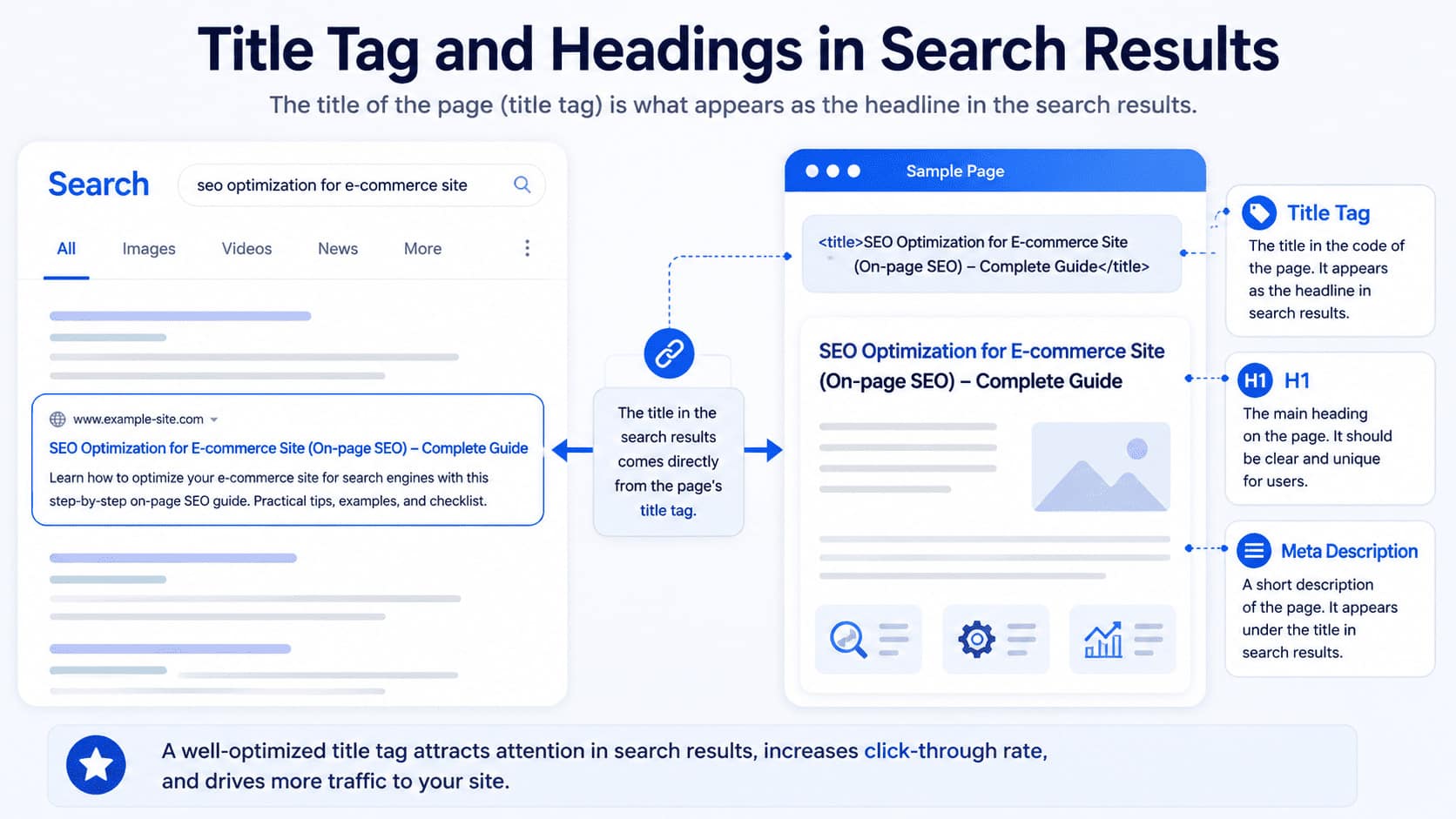
The title tag is the HTML element that provides a preferred title for the page:

<title>On-Page SEO: How to Optimize a Web Page for Search</title>

A useful title tag is:

  • unique to the page;
  • descriptive and concise;
  • aligned with the page's primary intent;
  • written in the same language as the main content;
  • specific enough to distinguish the page from other URLs;
  • free of repetitive keywords and boilerplate.

There is no universal rule that every title must contain exactly 60 characters. Google can truncate a title link to fit the available display width.

Google also does not promise to use the title tag word for word. Its title link documentation lists several possible sources, including:

  • the <title> element;
  • the main visual title;
  • heading elements such as the H1;
  • og:title;
  • other prominent page text;
  • anchor text on the page;
  • text in links that point to the page.

Keep the title tag, H1, visible content, and primary purpose consistent. They do not have to be identical, but they should not make conflicting promises.

Weak Title

SEO, On-Page SEO, SEO Optimization, Website Optimization

This version repeats broad phrases without telling the reader what the page provides.

Stronger Title

On-Page SEO: How to Optimize a Web Page for Search

This version identifies the topic and the practical outcome.

Avoid adding a year unless the content is genuinely reviewed and maintained for that year. A new date attached to unchanged advice creates a misleading freshness signal.

Use a Clear H1 and Useful Section Headings

The H1 is the primary visible heading. It should tell a reader what the page is about as soon as the page loads.

The clearest practical pattern is one main H1 followed by logically nested H2 and H3 headings.

More than one H1 is not automatically a penalty. The problem is ambiguity. If several headings appear equally prominent, readers and search systems may have difficulty identifying the primary title.

Good headings:

  • describe the section accurately;
  • help a reader scan the page;
  • reflect the relationship between sections;
  • use natural language;
  • remain meaningful outside the surrounding paragraph.

Weak heading:

More Information

Stronger heading:

How Google Generates a Title Link

Do not add keywords to every heading. A heading is a navigation and comprehension tool, not a storage location for repeated phrases.

Write a Useful Meta Description

A meta description is a short page summary that Google may use when generating a search result snippet.

<meta name="description" content="Learn how to optimize the content, title tag, headings, links, images, and structured data on a specific web page.">

The description should:

  • summarize the actual page;
  • be unique to the URL;
  • communicate the main benefit or scope;
  • use natural language;
  • avoid keyword lists;
  • avoid promises the page does not fulfill.

Google's snippet documentation explains that snippets are primarily generated from page content. Google may use the meta description when it provides a more accurate summary for a particular query.

Different searches can therefore produce different snippets for the same page.

There is no fixed character count that guarantees a complete display. Google truncates snippets as needed for the device and result format. Put the essential idea first and keep the description focused.

Review the Existing URL Without Creating an Unnecessary Migration

A page-level review should confirm that the existing URL is understandable, stable, and aligned with the content.

The URL does not need to repeat every keyword. Its wording alone cannot make a weak page rank.

Do not change an established address simply to make it shorter or insert another phrase. An existing URL may already have:

  • external links;
  • internal links;
  • search history;
  • bookmarks;
  • analytics continuity;
  • translated-page relationships.

Any URL change is a migration decision, not a routine copy edit. It requires a separate review of redirects, canonical signals, internal references, sitemaps, and translation relationships.

This article does not assign new URLs or redesign site hierarchy. It only checks whether the current page address creates a page-level clarity or consistency problem.

Add Useful Page-Level Internal Links

on page seo internal links

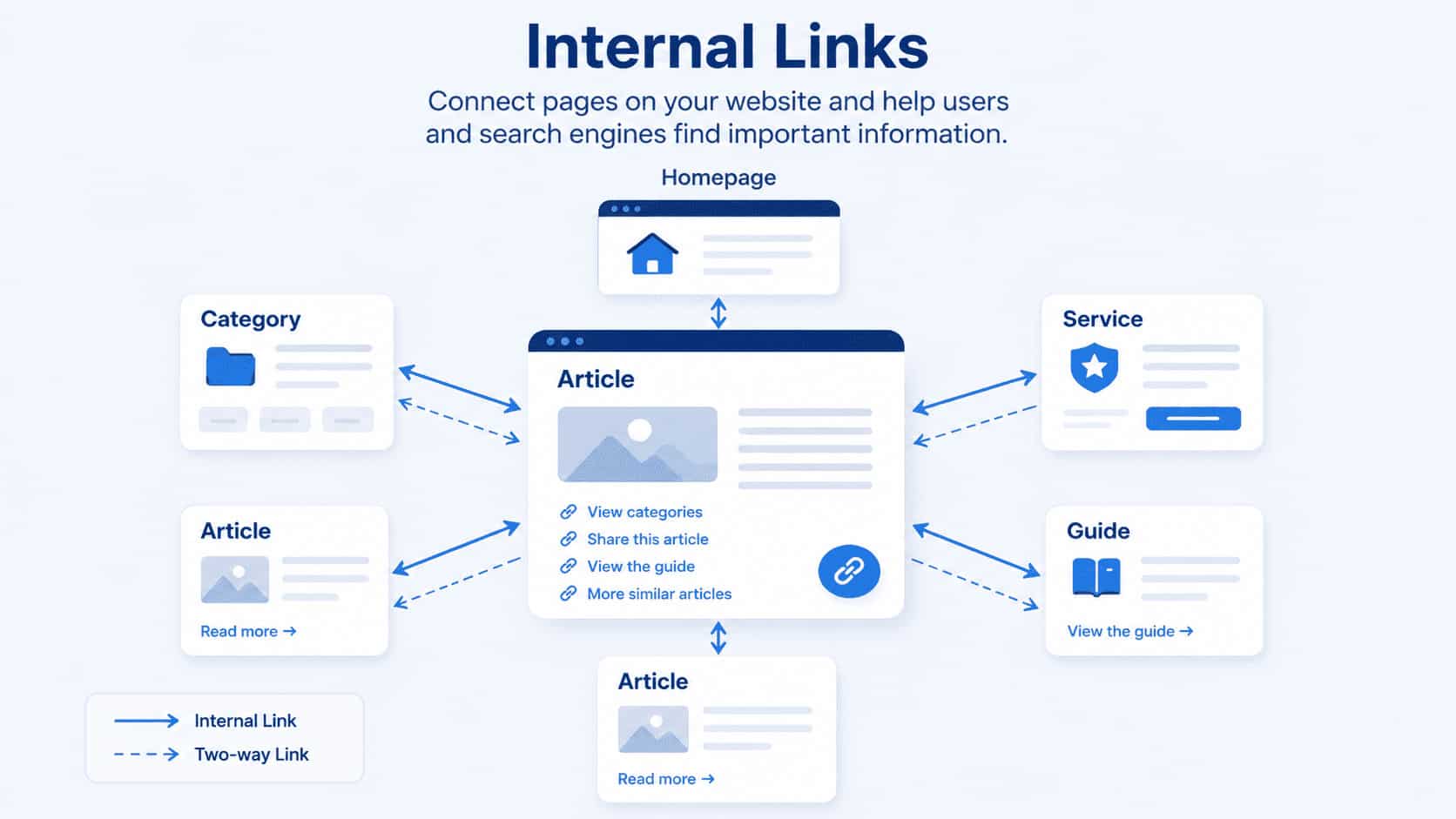
Internal links connect a page to relevant information elsewhere on the same website.

At the page level, a useful internal link should:

  • have a clear reason to appear in the surrounding paragraph;
  • lead to a page that expands or completes the current point;
  • use descriptive, natural anchor text;
  • be implemented as a crawlable HTML link;
  • avoid tracking parameters on normal editorial links;
  • avoid forcing the same keyword-rich anchor everywhere;
  • help the reader decide what to explore next.

Google's link best practices explain that crawlable links generally use an <a> element with an href attribute. Anchor text should help people and Google understand the destination.

Do not turn every article into a directory of services. A relevant link is better than several unrelated links added to meet a quota.

This page-level work does not decide the entire site's link graph, hierarchy, orphan-page policy, or click-depth targets. Those questions require a site-wide architecture review.

Optimize Images for Meaning, Access, and Performance

on page seo image optimization

Images should support the surrounding content instead of filling space between paragraphs.

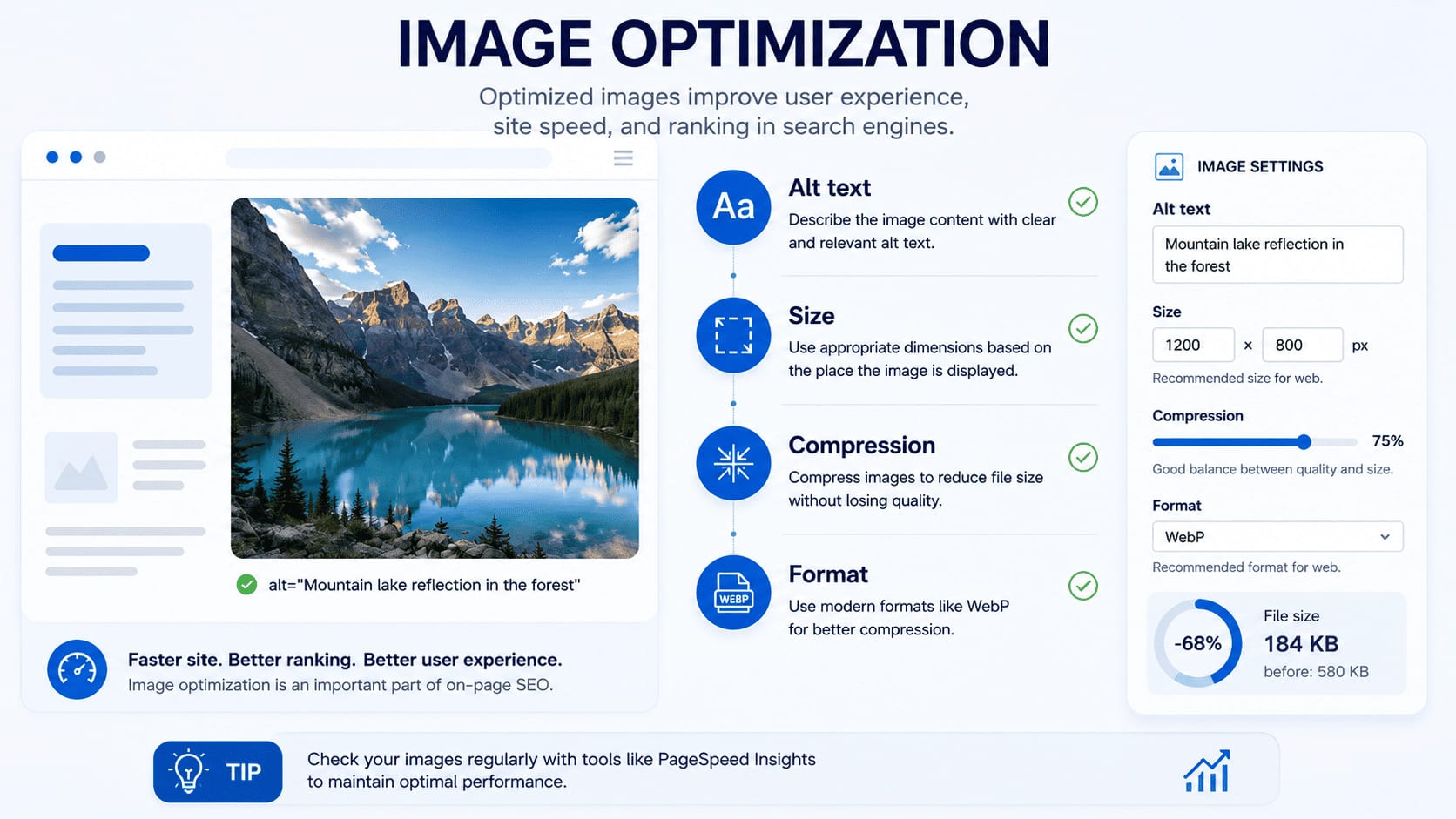
For each meaningful image, review:

  • whether it contributes to the section;
  • whether its dimensions suit the display;
  • whether the file is compressed appropriately;
  • whether the format is supported and efficient;
  • whether the image appears near relevant text;
  • whether width and height are defined to reduce layout shifts;
  • whether the filename is understandable;
  • whether the alternative text serves its accessibility purpose.

Alternative text should describe the image in context.

<img src="on-page-seo-elements.webp"
     alt="Main on-page SEO elements for a single web page">

Do not fill alt text with a list of keywords. Decorative images may need an empty alt attribute instead of a forced description.

Google's image SEO best practices emphasize making images discoverable and optimizing the pages where those images appear. Google can use alt text, nearby content, captions, filenames, and visual analysis to understand an image.

Image optimization also includes the user experience. A high-resolution image that adds no information and delays the main content is not an SEO improvement.

Use Structured Data That Matches the Visible Page

Structured data provides machine-readable information about entities and content on a page.

For an article, appropriate types and properties may include:

  • Article or BlogPosting;
  • BreadcrumbList;
  • a Person author;
  • an Organization publisher;
  • datePublished;
  • dateModified;
  • a representative image.

Choose markup based on the content that is actually present and on Google's supported search features.

Do not add:

  • an author who is not visible on the page;
  • a rating that users cannot see;
  • a false publication or update date;
  • FAQ markup for questions not shown to users;
  • product data on a non-product page;
  • fabricated claims designed only to qualify for a rich result.

Google's structured data introduction explains that markup must describe the page it appears on. Valid structured data can make a page eligible for certain search features, but it does not guarantee a rich result or a higher ranking.

There is no special "AI schema" required for AI Overviews or AI Mode.

Show Authorship, Experience, and Sources

Readers should be able to understand who created or reviewed expert content and why that person is qualified to discuss the topic.

A strong article may show:

  • the author's name;
  • a link to an author profile;
  • relevant professional experience;
  • an original publication date;
  • the date of the latest substantial review;
  • sources for factual claims;
  • the editor or reviewer when that role adds value.

Do not update the displayed date without reviewing the content. A meaningful update may include:

  • correcting outdated statements;
  • checking official documentation;
  • replacing obsolete examples;
  • adding a new process or limitation;
  • reorganizing the page to improve comprehension;
  • clarifying who created or reviewed the information.

Trust is demonstrated through accuracy, transparency, evidence, and accountable authorship. It is not created by adding unsupported superlatives.

Confirm Page-Level Technical Conditions

On-page content cannot perform normally if the page is unavailable to users or search systems.

For the specific page being edited, confirm:

  • it returns the intended HTTP response;
  • Google is allowed to crawl it;
  • it does not contain an accidental noindex;
  • its canonical points to the intended address;
  • the main content is available in rendered HTML;
  • the mobile version contains the important information;
  • intrusive elements do not block the main content;
  • the page uses HTTPS;
  • images and fonts do not cause severe loading problems;
  • essential interactions work.

These are page-level safeguards, not a full crawling or indexing diagnosis. If the review uncovers a pattern across many URLs, move the investigation into the technical SEO workflow.

Page experience should also be judged by real use, not one isolated laboratory score. For LCP, INP, CLS, and practical performance work, see the Core Web Vitals and Page Speed guide.

Measure the Effect of On-Page Changes

Before editing, record the baseline. After the page has been recrawled and enough time has passed, compare like-for-like periods.

In Google Search Console, filter performance data to the exact page and review:

  • impressions;
  • organic clicks;
  • click-through rate;
  • average position;
  • queries that show the page;
  • changes across related query groups;
  • countries and devices;
  • whether the intended URL appears for the intended searches.

Do not judge the edit by one keyword or one day of data. Search demand, seasonality, news events, result features, competitor changes, and normal measurement noise can influence performance.

Also review business and user outcomes, such as:

  • engaged visits;
  • completion of the article or important sections;
  • useful internal navigation;
  • leads, purchases, downloads, or other relevant actions;
  • traffic quality;
  • support questions that indicate missing information.

Search visibility is useful only when the page attracts an appropriate audience and helps that audience complete the intended task.

Use a Clean Before-and-After Process

  1. Record the date and exact scope of the edit.
  2. Save baseline Search Console and analytics data.
  3. Avoid changing several unrelated systems at the same time when a clean comparison matters.
  4. Confirm that Google has recrawled the page.
  5. Compare equivalent date ranges and account for seasonality.
  6. Review query groups, not only one head term.
  7. Document what improved, declined, or remained uncertain.
  8. Decide whether to keep, refine, or reverse the change.

An immediate movement does not prove causation. Treat on-page work as a measured process, not a promise of a specific ranking.

Common On-Page SEO Mistakes

One Page Serves Too Many Unrelated Intentions

A URL that tries to teach a topic, sell a service, compare vendors, publish news, and answer every related question has no clear primary job.

Choose the main intent. Keep supporting details that help complete it and direct genuinely separate tasks to their appropriate pages.

The Primary Phrase Is Repeated Mechanically

Keyword repetition cannot replace a useful answer.

Use the primary term where it improves clarity. Use accurate related terminology where the subject requires it. Read the passage aloud. If it sounds unnatural to a person, repeating it for a crawler will not improve the content.

The Title Promises More Than the Page Delivers

Words such as "complete," "ultimate," and "definitive" create an expectation. Do not use them unless the page actually covers the essential decisions, limitations, and actions.

The title tag, H1, description, and opening should describe the same resource.

Similar Keywords Get Separate Near-Duplicate Pages

Minor wording variations do not always require separate URLs.

Pages created for "on page SEO," "on-page SEO," "onpage SEO," and "internal page optimization" may compete for the same intent. Decide whether the user actually needs distinct resources before splitting the topic.

Keyword-to-URL assignments belong to a broader content and architecture review. Do not create another page during a routine on-page edit.

Internal Links Are Added Without Context

Linking every paragraph to a service page does not improve relevance.

Use a link when the destination gives the reader a useful next step. Make the anchor understandable and place it in a sentence that explains the relationship.

Structured Data Contradicts the Page

Markup should not contain authors, ratings, dates, questions, prices, or other facts that are absent from the visible content.

Validate the markup and check whether the selected type is supported for the intended search feature.

The Publication Date Changes but the Content Does Not

A fresh date attached to unchanged or outdated content can mislead readers.

Review the facts, sources, examples, process, and links. Change the update date when the revision is substantive enough to justify it.

Technical Problems Are Treated as Copy Problems

Rewriting a paragraph cannot resolve an accidental noindex, a server error, a conflicting canonical, or content that is unavailable in rendered HTML.

Confirm the page-level technical conditions and move broader patterns into a technical diagnosis.

Optimization Ends at Publication

Without a baseline and follow-up measurement, the team cannot tell whether an edit helped.

Document the change, allow time for recrawling and evaluation, then review both search performance and user outcomes.

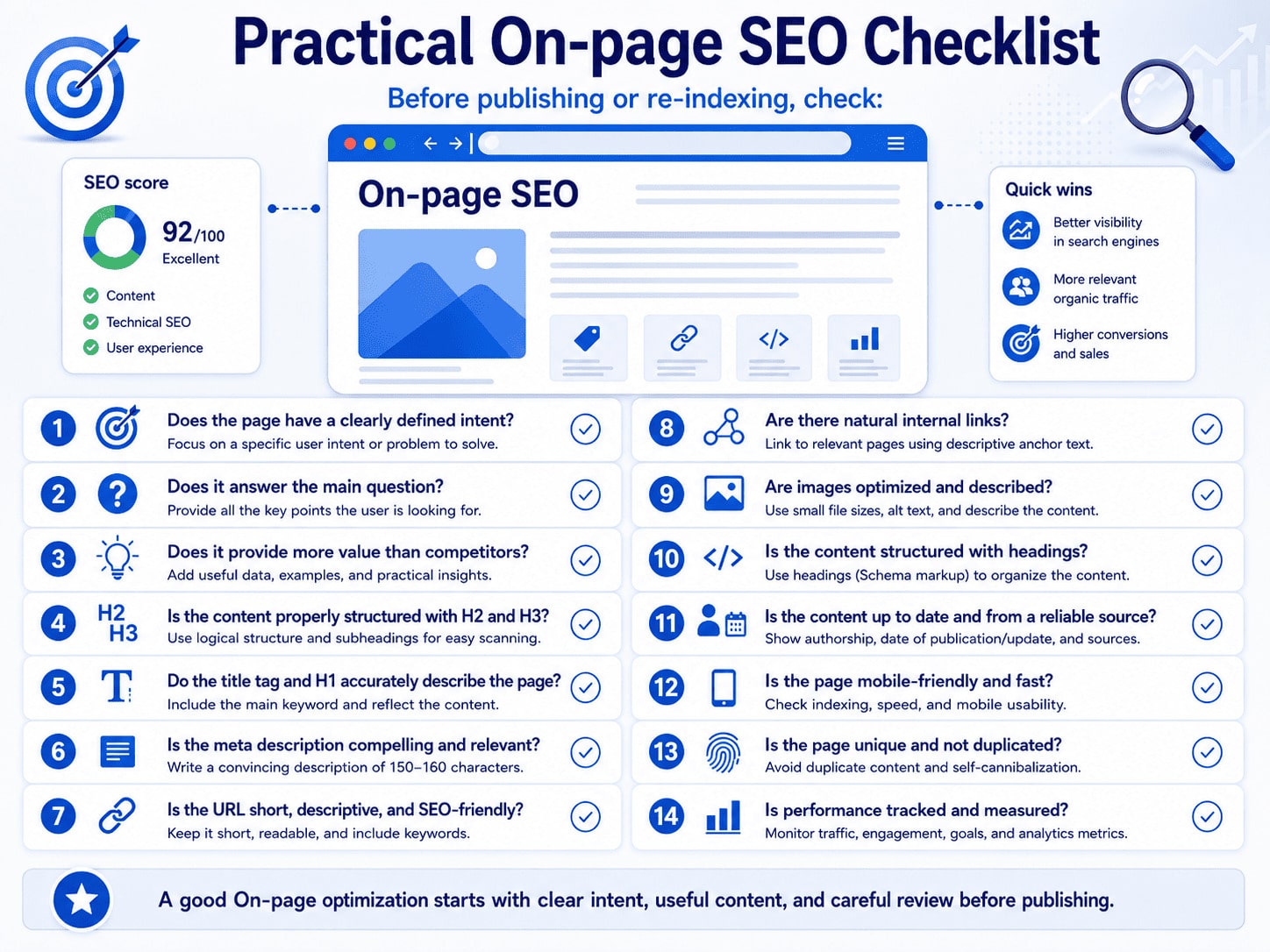
Practical On-Page SEO Checklist

practical on page seo checklist

Before publishing or requesting another crawl, confirm:

  • [ ] The page has one clear primary intent.
  • [ ] The page type and format fit that intent.
  • [ ] The opening answers the main question directly.
  • [ ] The content adds useful evidence, examples, or experience.
  • [ ] Unnecessary repetition and filler have been removed.
  • [ ] Related subtopics support the main purpose.
  • [ ] Separate intentions have not been forced into the same URL.
  • [ ] The title tag is unique, descriptive, and accurate.
  • [ ] The H1 communicates the same primary topic as the title.
  • [ ] H2 and H3 headings create a logical reading path.
  • [ ] The meta description summarizes the actual page.
  • [ ] The existing URL remains stable unless a separate migration is approved.
  • [ ] Internal links are relevant, descriptive, crawlable, and clean.
  • [ ] Images add meaning and use appropriate alternative text.
  • [ ] Image dimensions and file sizes support a good experience.
  • [ ] Structured data matches visible content.
  • [ ] The author, dates, and important sources are visible and accurate.
  • [ ] The page is crawlable, indexable, canonicalized correctly, and usable on mobile devices.
  • [ ] The main content is available in HTML.
  • [ ] A measurement baseline and review date have been recorded.

Frequently Asked Questions

What Is On-Page SEO?

On-page SEO is the improvement of content, organization, and HTML elements within a specific web page. It includes search intent, main content, the title tag, H1 and section headings, the meta description, page-level links, images, structured data, and relevant usability checks.

Is On-Page SEO the Same as Technical SEO?

No. On-page SEO focuses on the content and elements of a particular page. Technical SEO addresses crawling, indexing, rendering, canonicalization, performance systems, and other technical conditions that often affect many pages.

How Many Times Should a Primary Keyword Appear?

There is no universal correct number. Use the primary phrase where it is needed for clarity and use related terminology naturally when the topic requires it. A fixed keyword density is not a reliable optimization target.

How Long Should an SEO Article Be?

It should be long enough to complete its purpose without unnecessary material. A narrow question may need a short answer. A complicated process may need definitions, examples, limitations, and several steps. Word count is not a substitute for usefulness.

Should Every Page Have Only One H1?

One clear primary H1 is the simplest and most understandable pattern. Multiple H1 elements are not automatically a penalty, but several equally prominent titles can make the page hierarchy ambiguous.

Does a Meta Description Directly Improve Rankings?

Do not treat the meta description as a direct ranking lever. Its practical role is to summarize the page and potentially influence how the result is presented and whether the right user chooses to click. Google may instead generate a query-specific snippet from visible page content.

Does Structured Data Improve Rankings?

Structured data helps search systems understand page information and may make a page eligible for supported rich results. It does not guarantee a rich result or a higher position.

Should an Existing URL Be Changed to Add a Keyword?

Usually not without a separate migration review. The wording of the URL is only one small signal, while an established address may already have links, history, analytics continuity, and translation relationships. Do not change it as a routine copy edit.

How Do You Prepare Content for AI Overviews and AI Mode?

Use the same durable practices that support Google Search: create helpful and reliable content, make important information available as text, use clear sections, support claims, show authorship, use relevant images, make markup match the page, and keep the page indexed and eligible for snippets. There is no special AI schema or guaranteed inclusion method.

How Quickly Will On-Page Changes Affect Search Performance?

There is no fixed timeline. Google must recrawl and reprocess the page, and performance also depends on demand, competition, page quality, site conditions, and result features. Measure over an appropriate period instead of promising an immediate ranking change.

A Well-Optimized Page Has One Clear Job

Effective on-page SEO does not begin with a keyword counter. It begins by defining what the page must accomplish for a specific audience.

Search intent, useful content, title tags, headings, descriptions, links, images, structured data, trust signals, and page-level technical conditions should reinforce the same purpose.

The goal is not to publish another URL for a closely related phrase. The goal is to make the existing page the clearest and most useful resource for its assigned task, while sending separate intentions to the pages that already serve them.

Official Sources

Гласувай
crosschevron-down