Logo
SEO & Pricing

Google Search Console in 2026: A Complete Guide to SEO, Indexing and Google Visibility

google search console 2026
Published on: 03/09/2021
Modified: 02/08/2026

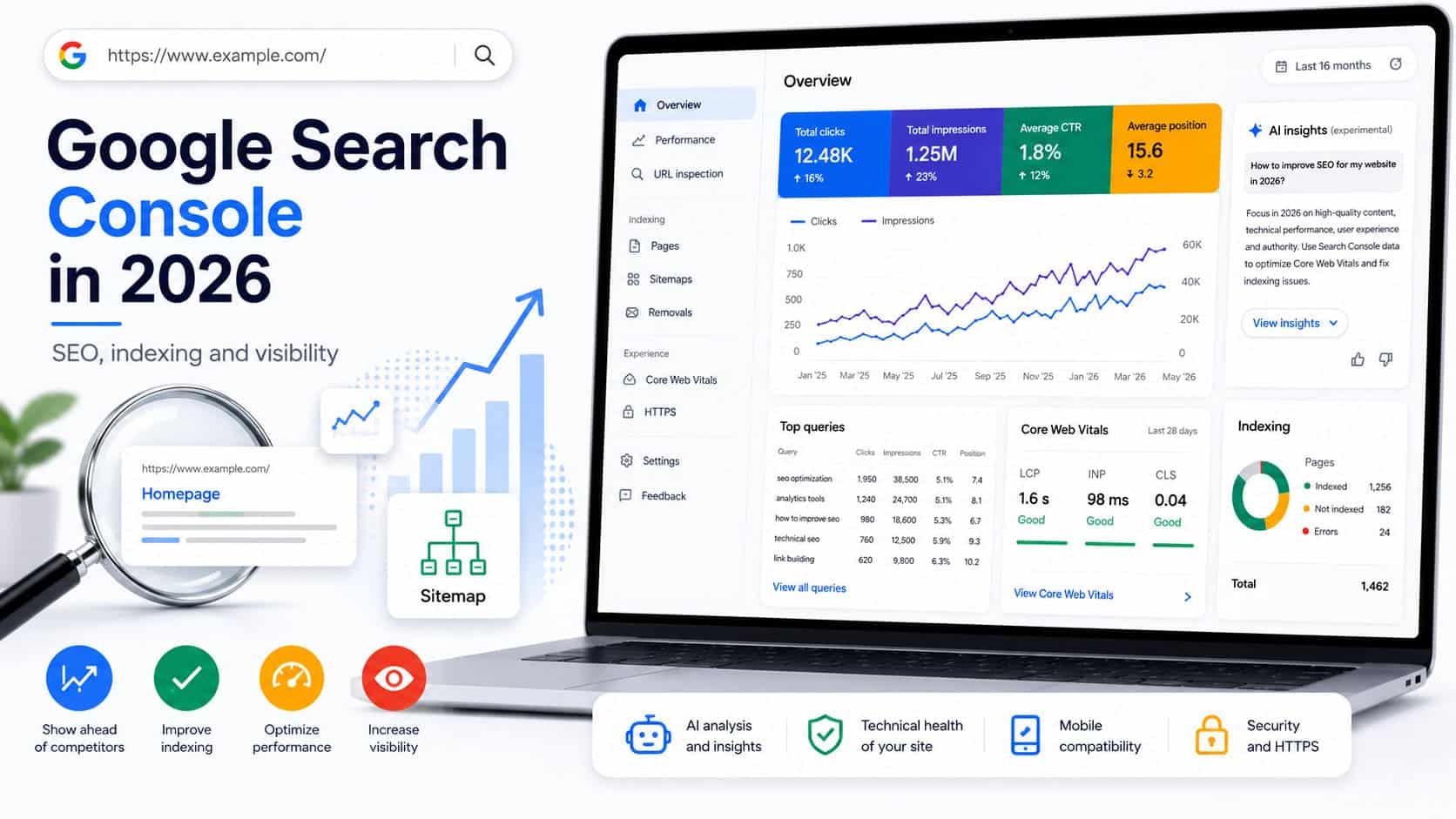
Google Search Console, often abbreviated as GSC, is a free Google platform for monitoring how a website is crawled, indexed, and presented in organic search results.

It allows you to understand:

  • which searches cause the website to appear;
  • which pages receive impressions and clicks;
  • whether Google can discover and index important URLs;
  • whether there are technical, structural, or security problems;
  • how the website performs on mobile and desktop devices;
  • which pages receive internal and external links;
  • whether the website has visibility in AI Overviews, AI Mode, Discover, Google News, and other Google formats.

Google Search Console does not automatically improve rankings. It provides the data required to make the right decisions. Real results come from how you use that data for technical improvements, content, internal linking, and overall SEO optimization.

When a website is being developed, Search Console should be configured before its official launch. This makes it possible to identify indexing, redirect, sitemap, and Googlebot access problems in good time.

What Is Google Search Console?

Google Search Console is Google’s official tool for website owners, SEO specialists, developers, editors, and marketing teams. The platform was previously known as Google Webmaster Tools.

GSC displays information directly from Google Search. This distinguishes it from external SEO platforms, which estimate rankings and traffic using their own databases.

Search Console does not require a separate tracking code. You only need to prove that you have the right to manage the relevant domain or URL.

The platform’s main applications are:

  • monitoring organic performance;
  • checking crawling and indexing;
  • identifying technical SEO problems;
  • analysing searches and landing pages;
  • monitoring Core Web Vitals;
  • managing XML sitemaps;
  • identifying manual actions and security breaches;
  • analysing internal and external links;
  • monitoring visibility across different search result elements;
  • analysing performance in Google’s generative formats.

The official Search Console reports include data on performance, indexing, user experience, enhancements, links, security, and manual actions.

Who Is Search Console Useful For?

Google Search Console is necessary for almost every public website, whether it is a corporate site, online store, information portal, media website, blog, or local business.

Business Owners

A business owner can monitor whether organic visibility is growing, which services attract interest, and whether important pages appear in Google.

SEO Specialists

SEO specialists use GSC to analyse queries, positions, CTR, cannibalisation, indexing, internal links, technical errors, and traffic declines.

Developers

Developers can identify problems involving robots.txt, HTTP responses, JavaScript rendering, mobile compatibility, structured data, and speed.

Editors and Authors

Editors can determine which topics and questions bring users to the website, which publications are losing visibility, and where content should be updated.

Online Stores

For ecommerce websites, Search Console helps monitor product pages, categories, variants, canonical URLs, structured data, product results, and large-scale indexing problems.

Google Search Console and Google Analytics 4 Are Not the Same

The two platforms measure different parts of the user journey.

Google Search ConsoleGoogle Analytics 4
Shows how the website performs in Google SearchShows what visitors do after entering the website
Measures impressions, clicks, CTR, and average positionMeasures sessions, users, events, and conversions
Shows the searches for which the website appearsUsually does not show the specific organic queries
Helps analyse indexingHelps analyse behaviour and conversions
Data comes from Google SearchData depends on the installed code and consent settings

Clicks in Search Console and organic sessions in GA4 almost never match completely. The reasons may include different time zones, reporting methods, consent settings, blocked scripts, canonical URL grouping, and different treatment of individual visits.

For a complete analysis, the two platforms should be used together. Search Console shows how the user discovered the website, while Analytics shows what the user did afterwards.

How to Add a Website to Google Search Console

After signing in to Search Console, you must create a property. There are two main property types.

Domain Property

This option covers the entire domain, including:

  • HTTP and HTTPS;
  • www and non-www versions;
  • all subdomains;
  • different directories and protocols.

Verification is completed through a DNS record. This is usually the most complete and recommended option.

URL-Prefix Property

This option covers only the specifically entered address and its subdirectories. For example:

https://example.com

It will not automatically include:

Verification can be completed using an HTML file, HTML meta tag, Google Analytics, Google Tag Manager, or DNS record.

What Access Levels Can Users Have?

Search Console allows different access levels:

  • owner;
  • full user;
  • restricted user;
  • associated user for certain services.

The owner has the broadest permissions, including the ability to manage other users. When working with an external SEO agency or consultant, you do not need to provide the password to your Google account. Add the specific business email address as a user.

Core SEO Terms in Google Search Console

To use the platform correctly, you need to understand the terms that appear in its reports.

Crawling

Crawling is the process through which Googlebot visits URLs and downloads their resources. This does not necessarily mean that the page will be indexed.

Googlebot

Googlebot is Google’s automated software that discovers, crawls, and processes pages, images, videos, and other resources.

Crawl Budget

Crawl budget is the approximate number of URLs that Google can and is willing to crawl during a given period. It is more important for large websites, online stores, and platforms with thousands of dynamic URLs.

Indexing

Indexing is the process through which Google processes content and adds it to its index. A crawled page may still not be indexed.

Canonical URL

The canonical URL is the version Google considers the main version when it discovers identical or similar content at more than one URL.

Search Console may display:

  • the user-declared canonical URL;
  • the canonical URL selected by Google.

The two values do not always match.

Noindex

The noindex directive tells search engines not to include a particular page in the index. For Google to see this directive, it must be able to access the page. If the page is also blocked through robots.txt, Google may be unable to read the noindex instruction.

Robots.txt

The robots.txt file controls which sections can be crawled. It is not a reliable method for permanently removing a page from search results.

XML Sitemap

An XML sitemap contains the URLs you want Google to discover and consider important. It is a signal, not a guarantee of indexing.

Query

A query is the phrase entered by the user in Google. In SEO practice, the terms keyword and search are also commonly used.

Impression

An impression is recorded when an element from the website is shown in search results under the conditions defined by Google for the relevant search type.

Click

A click is recorded when a user selects a result that takes them to a page on the website.

CTR

CTR is the percentage of impressions that result in a click:

CTR = clicks ÷ impressions × 100

A low CTR does not always indicate a problem. It depends on position, intent, brand, result type, advertisements, and the presence of AI answers.

Average Position

Average position is the average highest position of the website for the relevant impressions. It should not be treated as an exact and permanent ranking.

Search Type

Search Console can separate results by:

  • web;
  • images;
  • videos;
  • news.

Discover and Google News have their own reports when the website has sufficient data.

Search Appearance

This is the specific format in which the page appeared. Examples include rich results, videos, products, job listings, question-and-answer elements, or another supported format.

Structured Data

Structured data describes content in a format that search engines can process more easily. Schema.org through JSON-LD is the most commonly used method.

Core Web Vitals

Core Web Vitals are metrics for real user experience:

  • LCP measures how quickly the main content loads;
  • INP measures responsiveness during interaction;
  • CLS measures unexpected movement of page elements.

Rich Result

A rich result is an enhanced presentation in Google that may include product information, ratings, images, navigation, and other elements. Valid structured data creates eligibility, but does not guarantee display.

Branded and Non-Branded Searches

Branded queries contain the name of the organisation, website, product, or a related name. Non-branded queries describe a topic, need, product, or service without specifically searching for the brand.

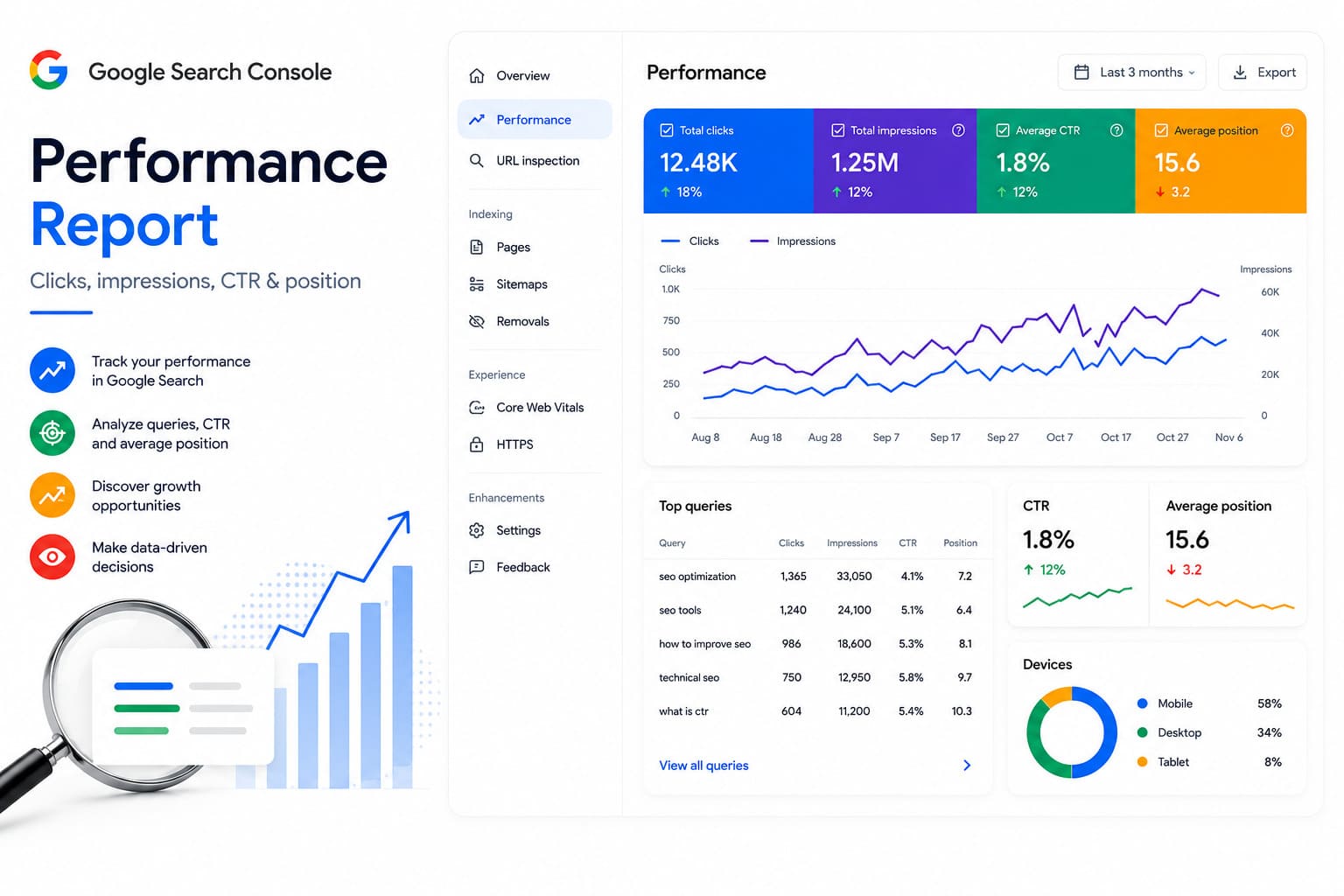
The Performance Report

Google Search Console Performance report

The Performance report is one of the most important parts of Search Console. It shows how the website performs in Google Search during the selected period.

The main metrics are:

  • total clicks;
  • total impressions;
  • average CTR;
  • average position.

The data can be divided by queries, pages, countries, devices, dates, and search appearance. Filters and comparisons between periods, devices, countries, pages, and queries are supported. Regular expressions can be used for more complex groupings.

How to Analyse Queries

The Queries section shows the phrases for which the website received impressions or clicks.

It can reveal:

  • which topics Google associates with the page;
  • the actual intent of visitors;
  • whether there are searches that are not covered sufficiently well;
  • whether the wrong page is being displayed;
  • whether there are opportunities for new sections and content;
  • whether branded searches are growing.

Not every query is shown. Some data may be hidden because of privacy protection and Google’s internal thresholds.

How to Analyse Pages

The Pages section shows which URLs receive visibility and traffic. After selecting a specific page, you can switch to Queries and view only the searches associated with that page.

This is one of the most practical ways to determine:

  • which page has potential for expansion;
  • which publication is losing rankings;
  • whether new content is beginning to appear;
  • whether two pages are competing for the same topic;
  • whether Google has selected the appropriate landing page.

The Last 24 Hours and Hourly Data

Search Console offers a view of the last 24 hours with an hourly breakdown. The newest portion of the data may be preliminary and may later be adjusted.

In 2025, Google also added weekly and monthly data grouping. This makes it easier to analyse seasonality, longer-term trends, and websites with lower daily traffic.

Annotations on Charts

Custom annotations can be added to charts. They are useful when:

  • a new design is launched;
  • titles are changed;
  • a migration takes place;
  • a technical correction is implemented;
  • a campaign begins;
  • a large-scale content update is carried out;
  • a server problem occurs.

This makes it easier to connect declines and increases with specific changes.

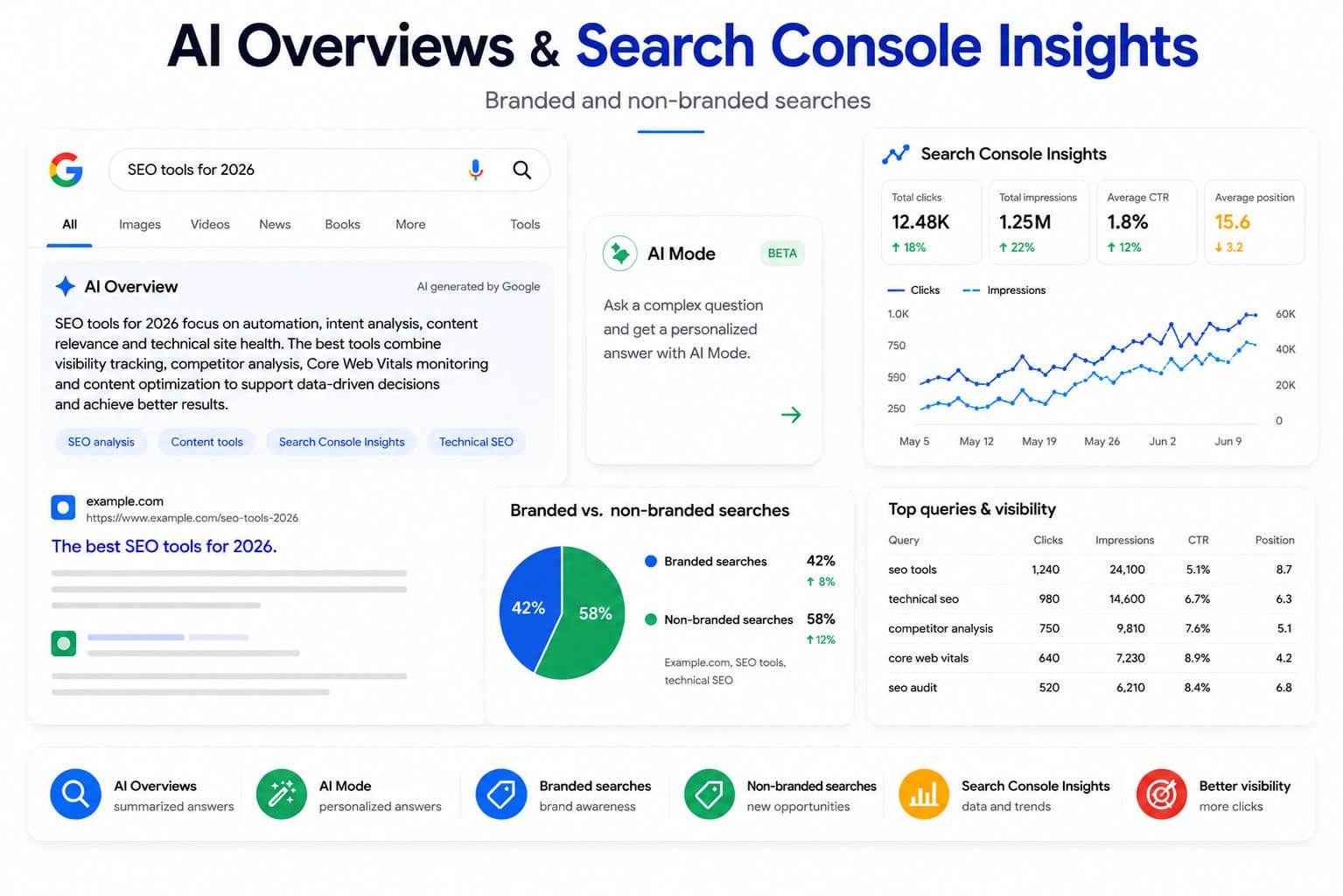
Branded and Non-Branded Queries

Search Console introduced a dedicated filter for separating branded and non-branded searches. Google uses automatic classification to determine whether a query is related to the name of the organisation or its products.

The filter is especially important because strong growth in branded searches may conceal a decline in general commercial and informational queries.

For example, a website may report more organic clicks while losing visibility for its main services. Without separating branded and non-branded queries, this problem can easily remain unnoticed.

The feature is available only for eligible properties and where sufficient data exists.

Data for AI Overviews, AI Mode, and Generative Search

AI Overviews, AI Mode and Generative Search Data google search console insights

In June 2026, Google began gradually introducing separate reports for performance in its generative search formats.

The new views may show impressions from:

  • AI Overviews;
  • AI Mode;
  • generative elements in Discover.

The data can be analysed by pages, countries, devices, and time periods. During the initial rollout, the reports focus primarily on impressions rather than the full set of clicks, CTR, and average position data.

The feature is being rolled out gradually and may not yet be available for every property. The absence of a dedicated AI report does not necessarily mean that the website has not appeared in AI Overviews.

Google does not require a separate type of “AI SEO” code or special schema for inclusion in these results. The core principles remain valid:

  • the page must be crawlable and indexable;
  • the content must answer the user’s question directly;
  • claims must be clear and verifiable;
  • important topics must be connected logically;
  • the source and author must be recognisable;
  • the technical implementation must allow the content to be extracted correctly.

Configuring Reports Through Natural Language

Search Console is testing the ability to configure the search performance report using ordinary text instructions.

For example, the user may request:

“Show queries from Bulgaria during the last three months that contain SEO and have a position between 4 and 15.”

The system suggests suitable filters, metrics, and comparisons. The result should be checked manually because the automatic interpretation may misunderstand part of the request.

At present, this feature is experimental and limited to the search results report.

Search Console Insights

Search Console Insights presents data in a more accessible format for website owners, authors, and editors who do not work with technical reports every day.

It may display:

  • the most visited content;
  • pages experiencing growth;
  • pages experiencing decline;
  • new content;
  • leading queries;
  • groups of similar searches;
  • countries and visibility sources.

The report is now integrated into the main Search Console interface rather than existing only as a separate experimental platform. Google has also added grouping of similar queries, making it easier to analyse an entire topic rather than only individual formulations.

Google is also testing the inclusion of content data from connected social profiles. This feature is limited to some websites and should not be treated as universally available.

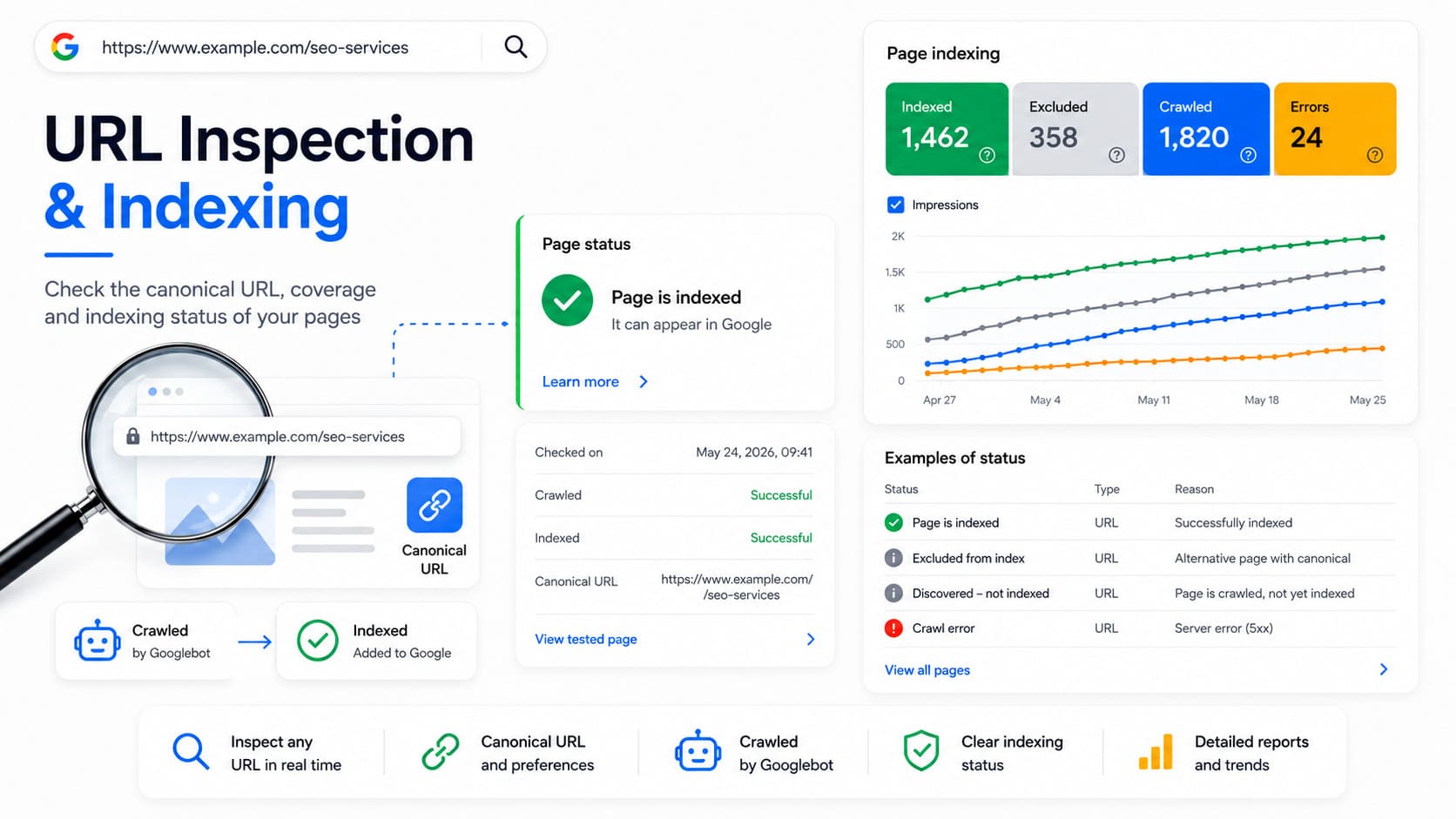
URL Inspection

GSC URL Inspection and indexing

The URL Inspection tool allows you to enter a specific page and see what Google knows about it.

It shows:

  • whether the URL is indexed;
  • when it was last crawled;
  • which Googlebot crawled it;
  • whether crawling is allowed;
  • whether a noindex directive was detected;
  • which canonical URL was declared;
  • which canonical URL Google selected;
  • through which sitemap the URL was discovered;
  • whether there are structured data problems;
  • whether the necessary resources were loaded.

Test Live URL

The live URL test checks the current state of the page. It is useful after a correction because the standard report may still display data from the previous crawl.

A successful test does not guarantee indexing. It shows that Google can probably access and process the page.

Request Indexing

After an important change, you can submit a request for indexing. This places the URL in a queue for recrawling, but does not guarantee when or whether it will be indexed.

The tool has daily limits and should not be used to submit hundreds of URLs. For large quantities, XML sitemaps, good internal architecture, and normal discovery through links should be used.

The Page Indexing Report

The former Coverage report has been replaced by the Page Indexing report. It shows which URLs known to Google are indexed and the reasons why the others are not.

The objective is not for every URL to be indexed. What matters is that the main canonical pages with value for users and search are indexed.

It is normal for the following not to be indexed:

  • administrative pages;
  • filters and parameters;
  • duplicate variants;
  • pages with noindex;
  • redirected URLs;
  • invalid addresses;
  • correctly removed content.

Indexing does not guarantee rankings either. A page may be present in the index but receive no visibility because of weak relevance, competition, quality, or insufficient signals.

Common Indexing Statuses

Crawled – Currently Not Indexed

Google visited the page but did not add it to the index. The reasons may include weak, duplicate, template-based, or insufficiently useful content.

Discovered – Currently Not Indexed

Google knows about the URL but has not yet crawled it. On large websites, this may indicate problems with quality, architecture, or crawl budget.

Duplicate Without User-Selected Canonical

Google believes the content duplicates another URL but has not found a clear canonical instruction.

Google Chose a Different Canonical

You specified one primary URL, but Google selected another. This may be caused by internal links, redirects, sitemaps, similar content, or conflicting signals.

Page with Redirect

The URL redirects to another page and normally should not be indexed independently.

Blocked by Robots.txt

Google cannot crawl the content. The URL itself may still appear in search results without a normal description if it receives links.

Excluded by Noindex

Google detected a directive not to index the page. This is normal when done intentionally.

Soft 404

The page returns a 200 status code but appears to contain missing or empty content. A typical example is a product page with no product and no useful alternative.

Server Error 5xx

The server was unable to complete the request. Persistent 5xx errors may restrict crawling and cause pages to be removed.

When there are many unexplained problems, a complete SEO audit is necessary because the cause is often a combination of architecture, canonical URLs, internal links, JavaScript, parameters, and content quality.

XML Sitemaps

The Sitemaps section allows you to submit the address of an XML sitemap and check whether Google can download and read it.

For most WordPress websites, the address is similar to:

https://example.com/sitemap_index.xml

The sitemap should contain the main canonical URLs you want indexed. It should not include:

  • pages with noindex;
  • redirected URLs;
  • 404 pages;
  • non-canonical duplicates;
  • blocked URLs;
  • parameter-based versions with no SEO value.

A “Success” status means that Google downloaded and processed the sitemap. It does not mean that every URL in it was crawled or indexed.

If the sitemap cannot be fetched, check:

  • whether the address returns an HTTP 200 status;
  • whether it opens without login details or a password;
  • whether there is a redirect chain;
  • whether the XML format is valid;
  • whether a firewall blocks Googlebot;
  • whether the domain matches the Search Console property;
  • whether there is a temporary server problem.

Video Indexing

If Google discovers videos on the website, a separate video indexing report may appear.

It shows whether the video:

  • was discovered on an indexed page;
  • is sufficiently visible;
  • has a suitable thumbnail;
  • is accessible for processing;
  • is the main content of the page;
  • is indexed as a video result.

Indexing the page itself does not automatically mean that the video is indexed.

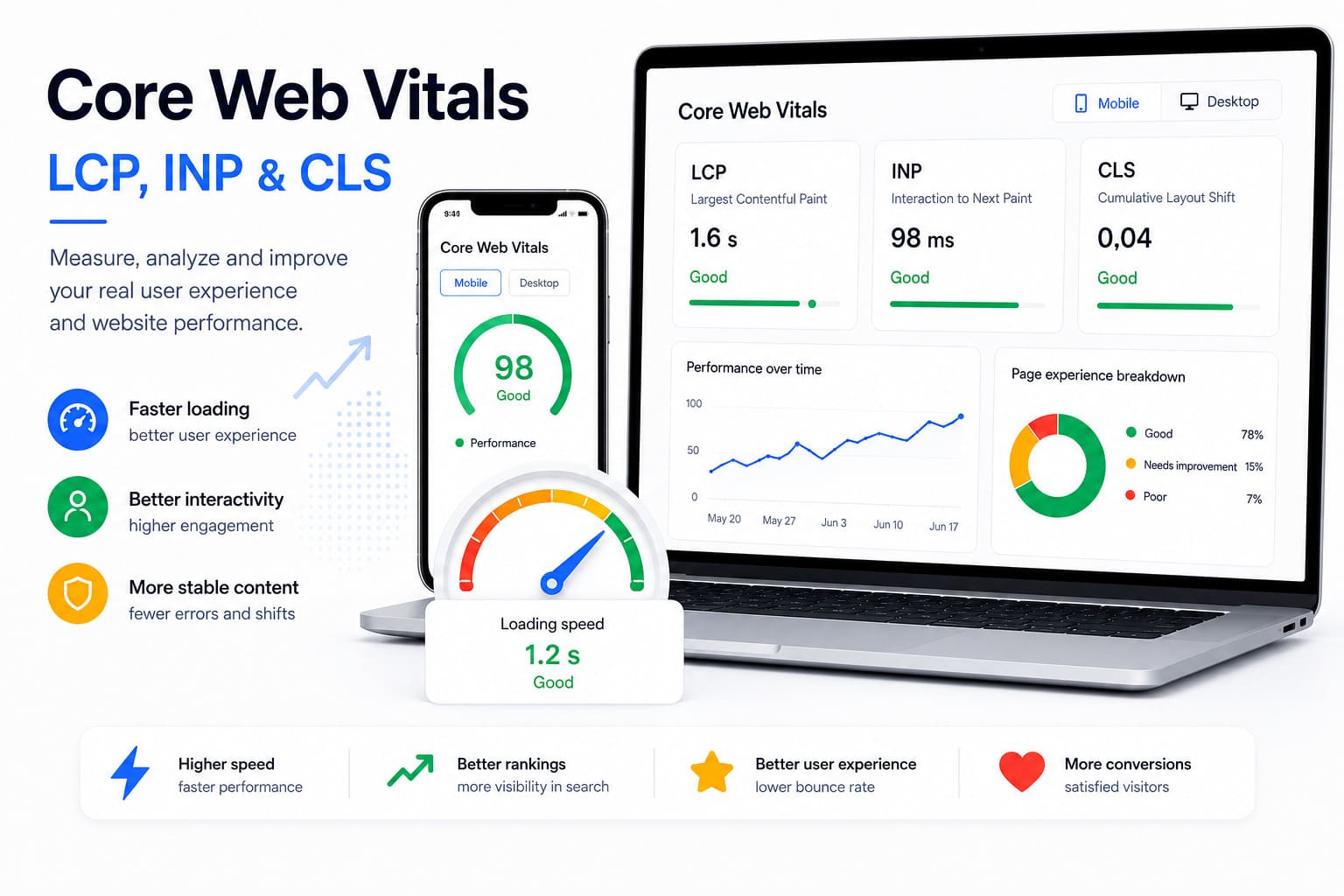
Core Web Vitals and User Experience

Core Web Vitals in Search Console

The Core Web Vitals report uses real field data from Chrome users. URLs are grouped as:

  • good;
  • need improvement;
  • poor.

The assessment is based on LCP, INP, and CLS. The data is grouped and may not include every page, especially on websites with low traffic.

Search Console is not a complete speed diagnostic tool. PageSpeed Insights, Lighthouse, Chrome DevTools, and real loading analysis should be used to identify specific technical causes.

The former standalone Mobile Usability report should no longer be the main reference point. Mobile performance should be checked through responsive design, testing on real devices, URL Inspection, and Core Web Vitals data.

During a website redesign, these metrics should be monitored before and after launch. A new design should not result in the loss of content, internal links, structured data, or speed.

Enhancements and Structured Data

Search Console displays additional reports when Google discovers supported structured data.

Depending on the website, this may include:

  • breadcrumbs;
  • products;
  • job listings;
  • videos;
  • events;
  • recipes;
  • reviews;
  • profiles;
  • discussion pages;
  • other supported types.

Each report may show valid items, valid items with warnings, and invalid items.

An error means that the item does not meet the requirements for the relevant rich result. A warning usually indicates a recommended but optional field.

When developing an online store, particular attention should be paid to product structured data, availability, price, currency, variants, images, and the relationship between product and category pages.

The Links Report

The Links section displays a sample of internal and external link data.

You can see:

  • the pages most frequently linked to from external websites;
  • the websites placing links;
  • the anchor texts used;
  • the pages with the most internal links;
  • which internal pages link to a particular URL.

The report is not a complete index of every backlink. Google displays a representative sample and groups the data by canonical URL. Therefore, a missing link in the report does not necessarily mean that Google has not discovered it.

How to Use Internal Links

Check whether important pages receive enough contextual links from other relevant pages.

A page available only through the XML sitemap but receiving almost no internal links may be interpreted as unimportant.

Not all pages need to receive the same number of links. The architecture should reflect business priorities, topics, and relationships between content.

Manual Actions

A manual action is imposed when a Google employee identifies a serious violation of spam policies.

The reasons may include:

  • unnatural inbound links;
  • outgoing paid links;
  • cloaked content;
  • automatically generated pages with no value;
  • structured data abuse;
  • a compromised website;
  • aggressive spam.

When a manual action exists, Search Console displays the type of problem and the affected section of the website.

After the cause has been removed, a reconsideration request can be submitted. It should explain what was identified, what was corrected, and how recurrence will be prevented.

Security Issues

Search Console may warn about:

  • malware;
  • phishing;
  • hacked pages;
  • unwanted downloads;
  • deceptive content;
  • injected spam URLs.

When such a warning appears, deleting one visible page is not enough. The method of intrusion must be identified, all files and records must be removed, the system and extensions must be updated, and compromised passwords must be changed.

Temporary URL Removal

The Removals tool allows a page to be hidden temporarily from Google Search.

This is not a method for permanent deletion. Temporary removal normally lasts for approximately six months and does not prevent Google from crawling the URL.

For permanent removal, an appropriate method should be used:

  • noindex when the page must remain accessible;
  • an HTTP 404 or 410 status when the content has been removed;
  • password protection when the information should not be public;
  • a 301 redirect when a genuine replacement exists.

Do not redirect unrelated pages to the homepage on a large scale. This may be treated as a soft 404.

Crawl Statistics

The Crawl Stats report is intended mainly for larger websites and technical specialists. It is found in the property settings and displays:

  • total crawl requests;
  • total download size;
  • average response time;
  • host status;
  • HTTP status codes;
  • file types;
  • crawl purposes;
  • Googlebot types used.

A sudden decline in crawling may be associated with server problems, Googlebot blocking, robots.txt changes, removal of many pages, or a change in the way Google evaluates the website.

A sudden increase may occur during a migration, the launch of a new section, the creation of many new URLs, parameter-based pages, or infinite navigation.

The report is a supporting tool. More crawling is not an SEO objective by itself and does not guarantee higher rankings.

Connecting Search Console with Google Analytics 4

Search Console can be connected to Google Analytics 4. After correct configuration, some organic data can be viewed in Analytics.

It is important that:

  • Search Console and GA4 use the correct properties;
  • the user has the required permissions;
  • the main website address is configured correctly;
  • the Search Console reports are published in GA4.

The connection does not fully unify the measurement methods. Differences between the two platforms will continue to exist.

Search Console API, Looker Studio, and BigQuery

For large websites, the standard interface may be insufficient.

Search Console API

The API allows automated extraction of data for queries, pages, devices, countries, and dates. It is suitable for custom reports, automated checks, and integrations.

Looker Studio

Search Console can be connected to Looker Studio for visual dashboards, periodic reports, and combining data with GA4, advertising platforms, or other sources.

Bulk Export to BigQuery

Bulk export is suitable for websites with large amounts of data. It allows deeper analysis without relying only on the limitations of the user interface.

When exporting, attention must be paid to how URLs, queries, countries, and devices are grouped. Summing different tables may result in double counting.

How to Use Search Console for Real SEO Growth

Simply monitoring graphs does not improve the website. The data must be converted into specific actions.

1. Find Pages Ranking Between Positions 4 and 15

These are often the best short-term opportunities. The page is already relevant, but may need:

  • a more complete answer;
  • clearer structure;
  • updated examples;
  • a better title;
  • stronger internal linking;
  • better alignment with intent;
  • more evidence and expertise.

Do not optimize mechanically based only on position. Check the actual results and the intent behind the query.

2. Find Pages with Many Impressions and Low CTR

Check:

  • the title;
  • the description;
  • the intent;
  • the freshness;
  • the type of competing results;
  • the presence of advertisements, maps, videos, and AI answers;
  • whether Google is rewriting the title.

A low CTR in position 8 does not mean the same thing as a low CTR in position 1.

3. Analyse Lost Queries

Compare the last three months with the previous period and filter the queries with the greatest loss of clicks or impressions.

Then check:

  • whether the landing page changed;
  • whether the position declined;
  • whether search demand decreased;
  • whether a new search result type appeared;
  • whether indexing was lost;
  • whether the title was changed;
  • whether a new competitor appeared;
  • whether the topic is divided between several pages.

4. Identify Cannibalisation

Select an important query and switch to the Pages section. If several URLs alternate, check whether:

  • they serve different intent;
  • their content overlaps;
  • the canonical URLs are correct;
  • internal links point to the desired page;
  • consolidation is required;
  • one page should be redirected.

The presence of two URLs is not automatically cannibalisation. A problem exists when they compete for the same intent and prevent Google from identifying the main page.

5. Find New Content Opportunities

Filter queries that receive impressions but are only partially covered by the page.

Do not add every phrase as a separate heading. Group similar questions by intent and determine whether they are suitable for:

  • expansion of an existing page;
  • a separate supporting publication;
  • a new service;
  • a question section;
  • a comparison page;
  • a case study or guide.

6. Improve Internal Linking

Use the Links report and your own website crawl to identify pages with few internal links.

Add links only where they are useful to the reader. The anchor should describe the destination page without every link repeating the same exact keyword.

7. Monitor Migrations and URL Changes

When changing platforms, domains, or structure, monitor:

  • indexable pages;
  • 404 errors;
  • redirects;
  • canonical URLs;
  • XML sitemaps;
  • clicks by directory;
  • branded and non-branded searches;
  • server errors;
  • Core Web Vitals.

Do not compare only total traffic. Check whether specific old pages have retained their new equivalents.

8. Separate Branded Growth from Non-Branded Growth

More searches for the company name may result from advertising, offline activity, or increased recognition.

To evaluate SEO development, monitor non-branded queries, landing pages, and topics that attract new audiences separately.

9. Monitor Local Pages

Search Console does not replace Google Business Profile data, but it shows queries and pages related to specific cities, areas, and services.

For Local SEO, analyse combinations of service and location and whether Google displays the correct local page.

10. Connect the Data with Business Results

More clicks do not always mean better results. Check which pages generate enquiries, orders, registrations, or other important actions.

Search Console shows the opportunity for a visit. GA4, the sales system, and actual business data show the value of that visit.

How to Diagnose a Decline in Organic Traffic

When traffic declines, do not begin by immediately changing the content. First determine the nature of the problem.

Check Whether the Decline Is Real

Compare:

  • clicks and impressions;
  • branded and non-branded queries;
  • mobile and desktop devices;
  • countries;
  • search types;
  • the latest weeks with the same period in the previous year.

Determine the Scope

Establish whether the decline affects:

  • the entire website;
  • one directory;
  • a particular page type;
  • a specific country;
  • mobile devices;
  • one main topic.

Check Indexing

Look for increases in:

  • Crawled – Currently Not Indexed;
  • Discovered – Currently Not Indexed;
  • server errors;
  • blocked pages;
  • unexpected canonical URLs;
  • noindex;
  • 404 and soft 404 errors;
  • redirects.

Check External Factors

Possible causes include:

  • changes in search demand;
  • seasonality;
  • a Google core update;
  • new competitors;
  • changes in search results;
  • AI Overviews;
  • lost links;
  • reputation problems;
  • changes to products or services.

When the decline affects important business pages and the reason is unclear, a focused SEO consultation may prevent rushed changes that could worsen performance further.

Common Mistakes When Using Search Console

Treating Every Non-Indexed URL as an Error

Not every URL should be in the index. Filters, duplicates, and redirected URLs should usually remain outside it.

Submitting Indexing Requests in Bulk

This does not solve problems involving quality, architecture, or duplication.

Treating Average Position as an Exact Position

The value is averaged across different searches, devices, countries, and moments in time.

Optimizing Only for CTR

A more aggressive title may attract more clicks but bring the wrong audience or create a mismatch with the content.

Deleting URLs Through the Removals Tool

This tool hides the URL temporarily. It does not replace noindex, 404, 410, password protection, or a correct redirect.

Treating a Successful Sitemap as a Guarantee

A successfully processed XML sitemap does not mean that every URL is indexed.

Blocking Through Robots.txt Before Google Sees Noindex

When a page is blocked, Google may be unable to read the meta directive.

Relying Only on Search Console for Backlinks

The report shows a sample and is not intended for complete backlink profile analysis.

Monitoring Only Total Traffic

Overall growth may conceal losses for main services, products, or non-branded queries.

Changing Everything at Once

When content, titles, URLs, design, and internal links are all changed simultaneously, it becomes difficult to determine what helped and what caused harm.

How Often Should You Check Search Console?

The frequency depends on the size and activity of the website.

Every Week

Check:

  • manual actions;
  • security issues;
  • unusual declines;
  • server errors;
  • important indexing problems;
  • results from recently published pages.

Every Month

Analyse:

  • branded and non-branded queries;
  • pages with the greatest growth and decline;
  • positions between 4 and 15;
  • pages with many impressions and low CTR;
  • new content opportunities;
  • cannibalisation;
  • Core Web Vitals;
  • internal links;
  • visibility in AI and other formats.

After a Major Change

After a migration, redesign, URL change, or new platform implementation, checks should be significantly more frequent during the first weeks.

What Search Console Cannot Tell You

Although it is a core SEO tool, GSC has limitations.

It does not show:

  • every query because of data protection;
  • unlimited historical data;
  • every backlink;
  • the exact daily position for every user;
  • complete behaviour after a visit;
  • the reason for every ranking change;
  • competitors’ actions;
  • the exact value of organic traffic;
  • a complete technical audit of the website.

Search Console should be combined with Analytics, crawling software, server log analysis, speed tools, SERP research, and real business data.

Frequently Asked Questions

Is Google Search Console Free?

Yes. The platform is free and provided by Google.

Is a Tracking Code Required?

No. Search Console does not use a separate code to collect search data. You only need to verify ownership.

How Long Does It Take for Data to Appear?

After successful verification, several days may be required before the reports begin to display sufficient information.

Can I Use Search Console Without Google Analytics?

Yes. The two platforms are independent, but using them together provides a more complete picture.

Does an Indexing Request Guarantee That a Page Will Be Added?

No. It only submits the URL for another check.

Why Was the Page Crawled but Not Indexed?

Possible reasons include duplicate, insufficient, template-based, or weak content, as well as conflicting canonical signals.

Does an XML Sitemap Guarantee Indexing?

No. It supports discovery, but Google independently decides which pages to crawl and index.

Can Search Console Remove a URL Permanently?

Not through the temporary removal tool. Permanent removal requires noindex, an HTTP 404 or 410 status, password protection, or another appropriate method.

Does Search Console Show Every Keyword?

No. Some queries may be hidden because of privacy protection and internal limitations.

Are There Separate Data for AI Overviews?

Google began introducing separate generative search reports in 2026, but the feature may still not be available for every website.

What Is a Good Average Position?

There is no universal value. Position should be interpreted based on the query, intent, device, country, and business importance.

What Is a Good CTR?

There is no universal good CTR. It depends on position, brand, result type, competition, and the presence of advertisements or AI elements.

How to Use Search Console Correctly in 2026

Google Search Console is no longer only a tool for checking whether pages are indexed. It connects the technical state of the website, user searches, content, speed, structured data, and new artificial intelligence formats.

It provides the greatest value when the data is used systematically:

  • problems are assessed according to their actual importance;
  • branded and non-branded visibility are analysed separately;
  • important pages are monitored by queries and intent;
  • technical changes are annotated and measured;
  • content is updated according to real searches;
  • indexing is analysed at template and page-type level;
  • SEO metrics are connected with actual business results.

For websites with many services, products, languages, or technical dependencies, these tasks usually require coordination between content, development, and an experienced SEO agency rather than simply reviewing the graphs from time to time.

Search Console shows where a problem or opportunity exists. Sustainable growth comes from prioritising it correctly and improving the website consistently.

5/5 - (1 vote)
crosschevron-down