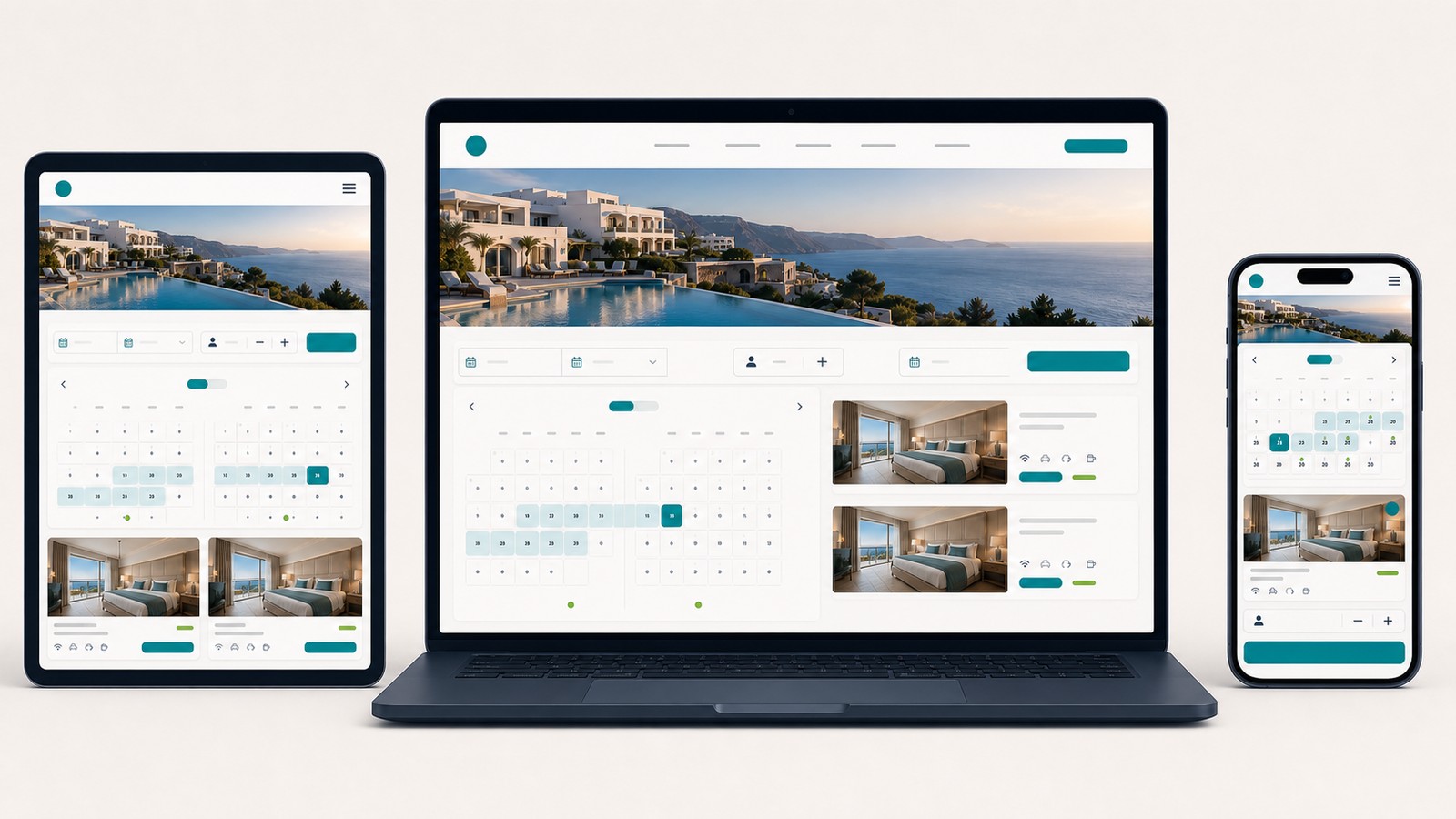
A real estate website is not a company brochure with property listings added later. It is a working system that connects properties, agents, locations, search filters, inquiries, MLS or CRM data, and visibility in search engines.
Planning should not begin with homepage colors or a ready-made theme. First determine what property data the site will manage, where that data will come from, how people will search it, how leads will reach the right person, and what will happen when a listing becomes pending, sold, rented, withdrawn, or otherwise unavailable.
The most important early decision is the information model. If listing fields, filters, source systems, and URL rules are defined after the visual design is complete, the usual results are difficult administration, duplicate listings, stale inventory, uncontrolled filter URLs, and limited room for SEO growth.
This guide covers real estate-specific website planning. It does not replace the broader architecture work required for every type of website, and it does not prescribe one universal structure for every brokerage or market.
Different real estate businesses need different data, workflows, and page types.
| Website type | Primary goal | Typical requirements |
|---|---|---|
| Local real estate brokerage | Generate buyer, seller, landlord, and tenant leads | Listings, agent profiles, neighborhood pages, valuation or consultation forms, MLS or CRM integration |
| Individual agent website | Build personal trust and attract clients | Agent profile, selected listings, local expertise, reviews, contact options, buyer and seller resources |
| Home builder or developer | Market specific communities and available units | Communities, buildings, floor plans, lots or units, availability, construction stages, amenities, timelines |
| Property management company | Attract owners and renters while supporting operations | Rental listings, owner services, tenant information, maintenance requests, application workflows |
| Specialized property catalog | Organize inventory in a defined niche | Advanced filters, custom property attributes, locations, comparison tools, specialized inquiry forms |
| Multi-broker listing portal | Aggregate inventory from multiple contributors | Accounts, listing submission, moderation, paid plans, data licensing, duplicate control, abuse prevention |
A small brokerage with 80 active listings does not need the infrastructure of a national portal. A portal with hundreds of thousands of listings cannot be managed like a basic company website with manually created pages.
A real estate website shares some characteristics with a product catalog website because it organizes many structured items. Real estate adds important complications: listing availability changes quickly, the same property may appear through several sources, data-display rights may be limited, and location and agent responsibility are central to each record.
Features should follow the real sales and service process. They should not be copied from a competitor simply because they look modern.
Before a technical specification is written, the business should answer:
"More traffic" is not a complete business goal. More useful outcomes include:
These outcomes determine which pages, forms, data fields, integrations, and analytics events the site needs.
For a US brokerage, the listing source is one of the most important planning decisions.
Common models include:
The website team must know which source controls each field and how conflicts are resolved. Price should not come from one system while status comes from another unless there is a documented synchronization rule.
Internet Data Exchange, commonly called IDX, allows eligible MLS participants to display certain MLS listing information electronically under applicable rules and permissions. The National Association of Realtors IDX policy provides a national policy framework, but the local MLS controls its own implementation details, fields, display requirements, update rules, and vendor access.
Before selecting a theme, plugin, or feed provider, confirm:
The site should not scrape listings from another website or assume that publicly visible data can be republished. Data rights and display obligations must be resolved with the brokerage, local MLS, vendor, and legal advisors before development.
Every real property should have a stable internal identifier. Depending on the system, this may be an MLS number, a CRM record ID, or a website-specific property ID connected to the source record.
A change in price, description, open-house time, or assigned agent should update the same property record. It should not create a new URL.
If several systems can send the same property, define a deduplication key and source priority. A title and price alone are not reliable identifiers.
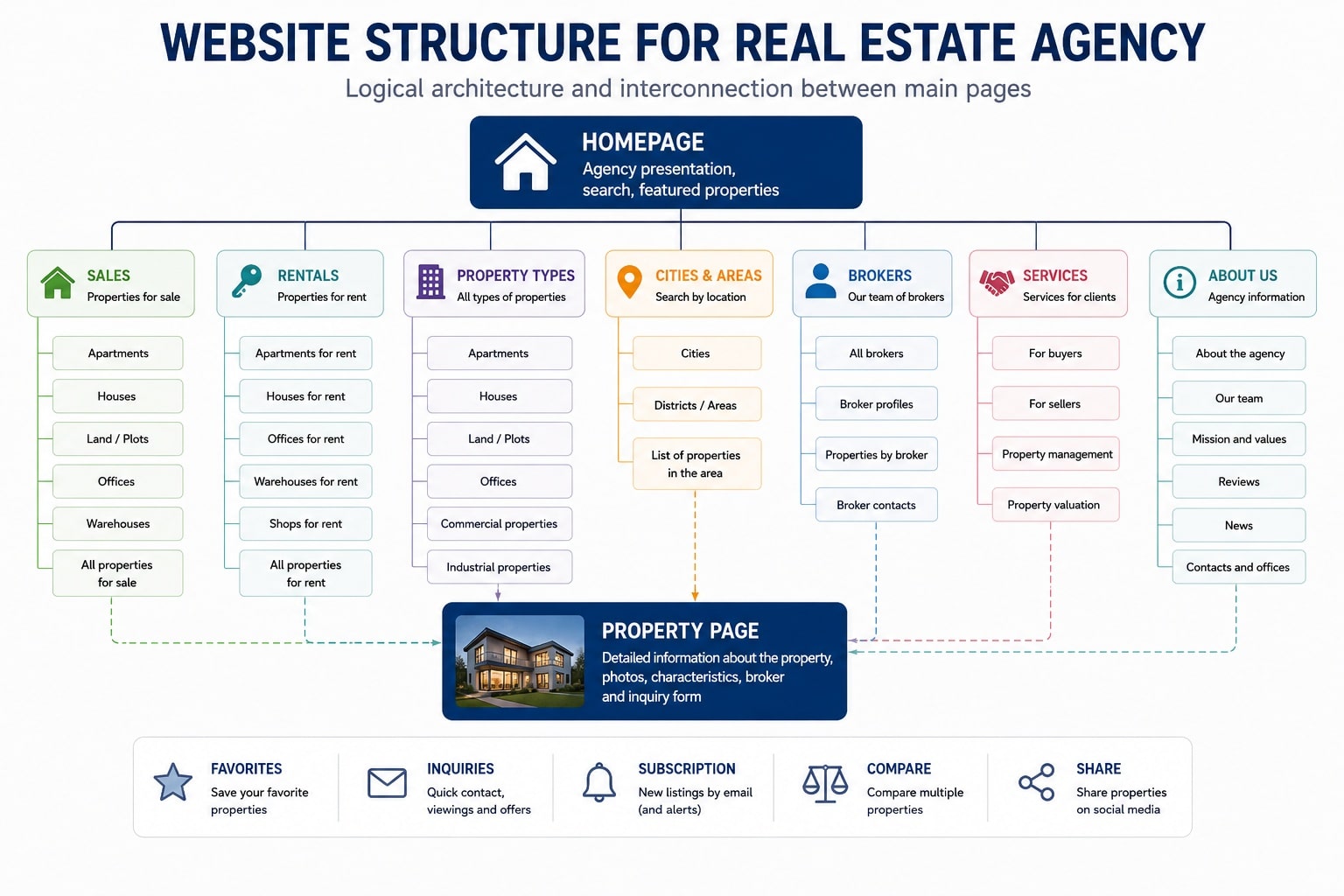
The structure should help visitors, agents, search engines, and internal systems understand how properties and services connect.
A brokerage website may include:
Not every combination belongs in the primary navigation. Users should be able to reach relevant listings without navigating a menu that attempts to expose every city, property type, price range, and feature.
Location, property-type, and transaction pages should not be created automatically just because a keyword exists. They need enough active inventory, distinct information, stable demand, and a clear purpose.
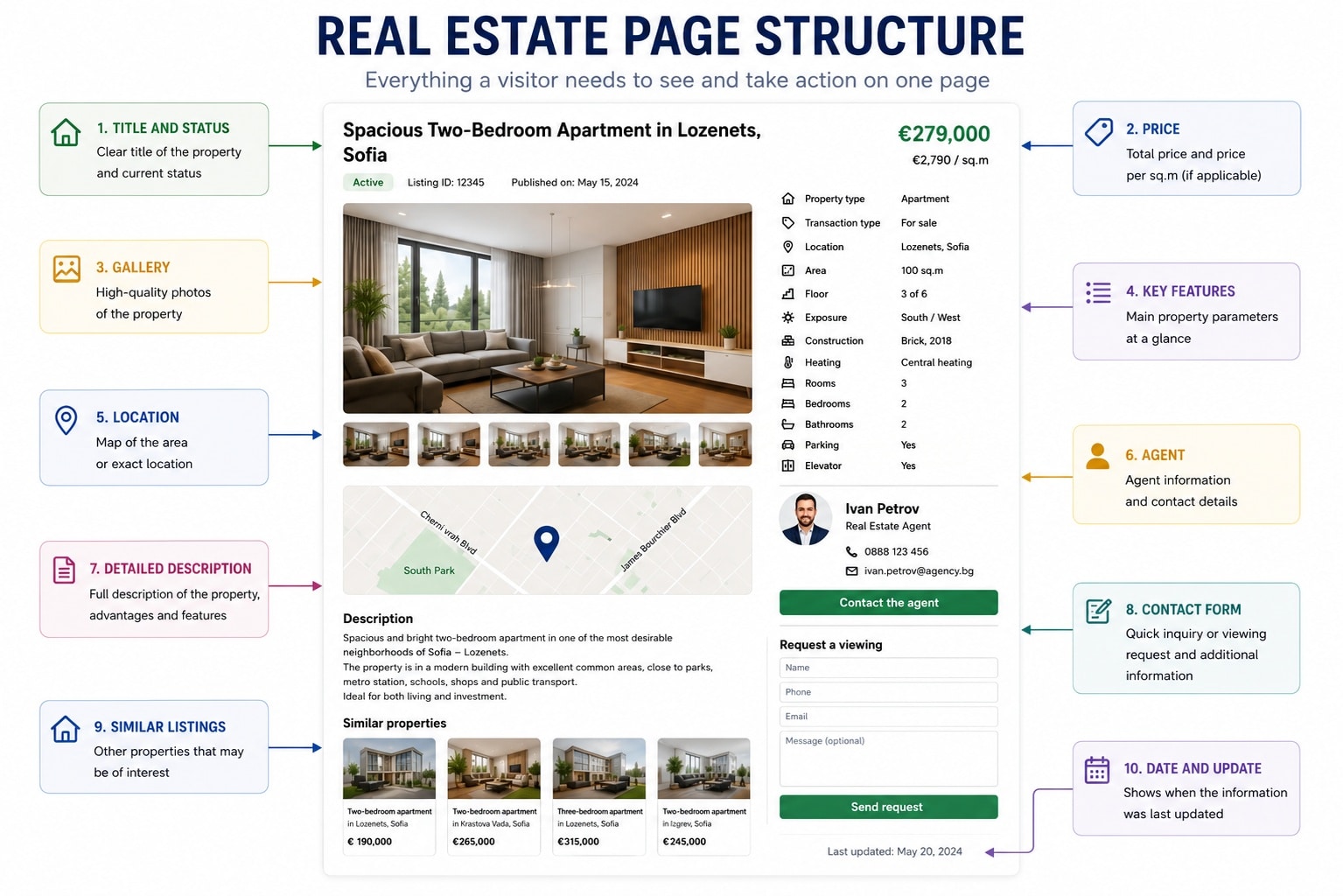
The listing page is the most important repeated page type in most real estate catalogs. Its fields should be defined before designers create cards, tables, filters, or templates.
| Field | What it may contain |
|---|---|
| Property ID | Stable internal identifier and the applicable MLS number |
| Listing status | Active, coming soon when permitted, pending, contingent, sold, rented, withdrawn, expired, or another source-defined status |
| Transaction type | Sale, long-term rental, short-term rental when applicable, lease, or another defined transaction |
| Property type | Single-family home, condo, townhouse, multifamily property, land, office, retail, industrial, or another controlled type |
| Location | City, neighborhood, ZIP code, service area, and an appropriate address-privacy level |
| Price | Current price, currency, and any required price qualifier |
| Size | Living area in square feet, lot size, acreage, or the units appropriate to the market |
| Rooms | Bedrooms, bathrooms, and other useful room details |
| Property features | Year built, parking, heating and cooling, accessibility features, outdoor areas, association information, and condition |
| Media | Photos, floor plans, video, virtual tour, and captions or descriptions |
| Responsible party | Listing brokerage, agent, office, and approved contact information |
| Freshness | Date listed, date modified, and the last verified status when appropriate |
Commercial and industrial properties require additional fields. Useful examples include:
The data model should use controlled values where consistency matters. Free-text fields are still useful for property-specific context, limitations, and benefits, but they should not be the only place where important facts are stored.
A useful property page should answer the visitor's main questions quickly while providing enough detail for a serious decision.
Plan for:
Avoid descriptions that simply repeat the structured fields or copy generic text from a feed. A useful description explains what is distinctive, what the layout supports, what limitations should be understood, and why the property may fit a particular practical need.
Do not promise that a listing is available unless the source data is current enough to support that statement.
High-quality media is important, but an oversized gallery should not make the property page slow or difficult to use.
Plan rules for:
The first visible property image should not wait for unnecessary scripts. Google also warns that lazy-loaded content must be implemented so it becomes available when visible and does not depend on clicks or scrolling that a crawler cannot perform, as described in its lazy-loading guidance.
Alternative text should describe the image's useful content. It should not be a list of target keywords.
An exact public address is not appropriate in every situation. A seller, landlord, brokerage agreement, MLS rule, or safety concern may require a lower level of location precision.
Possible display levels include:
The rule should be consistent and driven by the authorized source. An approximate map must not imply that its marker is the property's exact location.
Filters are not decorative controls. They represent how users narrow inventory.
Residential filters may include:
Commercial and industrial users may care more about loading access, clear height, electrical service, zoning, divisible area, lease type, or proximity to transportation infrastructure.
Only add a filter when:
On mobile, users should be able to open, edit, and clear filters easily. The interface should show which filters are active and, where practical, how many results remain before the user applies a complex search.
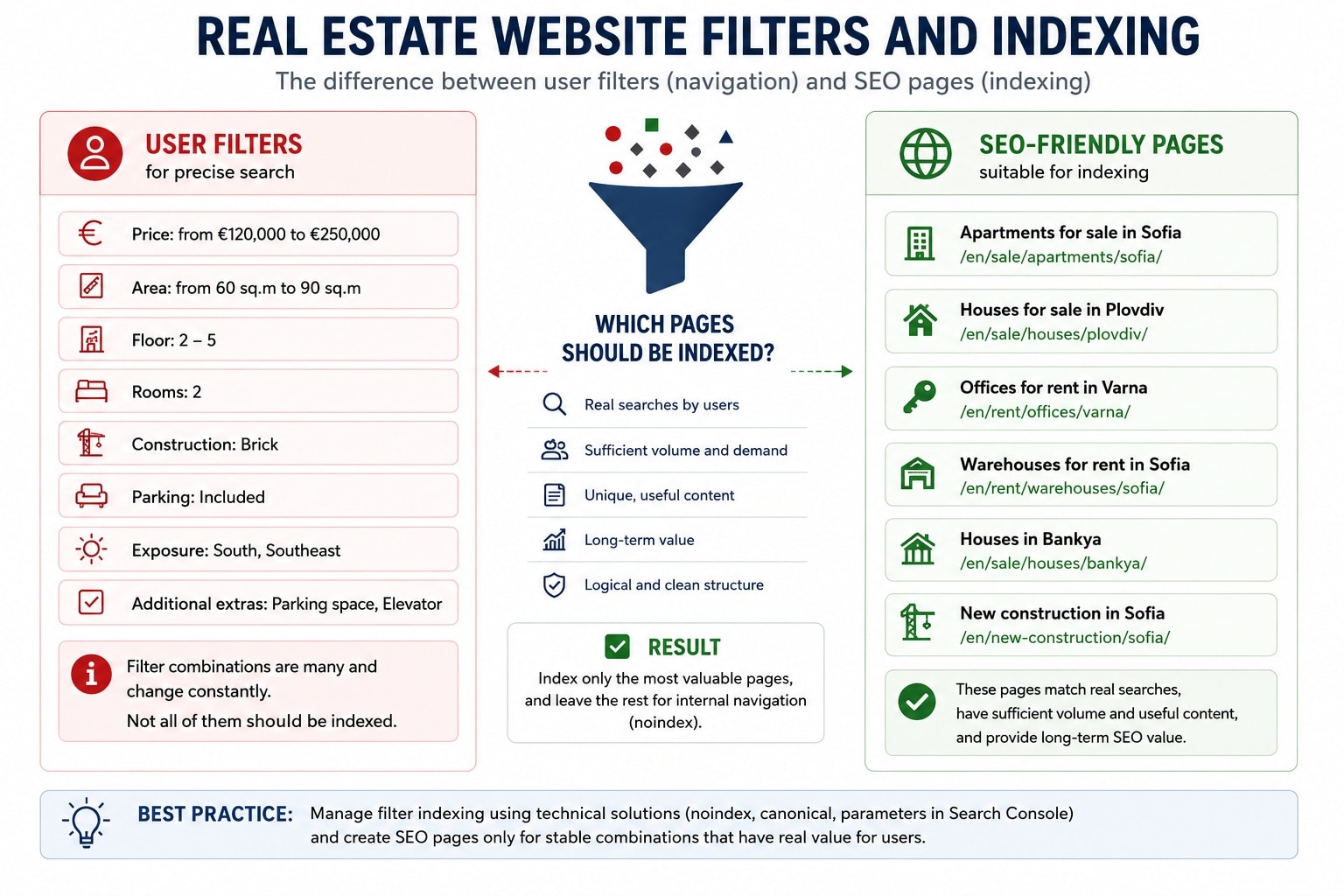
This is one of the most important SEO decisions for a real estate website.
If every filter and every combination creates a crawlable URL, the site can generate an enormous number of pages. A combination of city, neighborhood, property type, price, bedrooms, square footage, lot size, age, and features may have no listings and no lasting value.
Google's current faceted navigation guidance explains that filter combinations can create a very large URL space and consume substantial crawling and server resources.
The specification should separate:
A stable landing page could cover a durable combination such as:
That page still needs real demand, enough active inventory, useful local information, and a purpose that remains valid when individual listings change.
A highly specific combination such as a three-bedroom home within a narrow price range, with a pool, built within five years, and on a corner lot may be useful as a temporary filter. It usually does not need a permanent indexable landing page.
This separation should be part of the site's SEO optimization from the planning stage, not a cleanup after thousands of weak URLs have been created.
Duplicate listings can appear when:
Use a stable identifier and a documented matching process. Address, unit, source ID, and other approved attributes may support matching, but the rule must account for privacy and inconsistent source data.
If several URLs can display the same property, choose one primary version. Canonical tags can help search engines understand a preferred version, but they are not a substitute for preventing unnecessary duplicates.
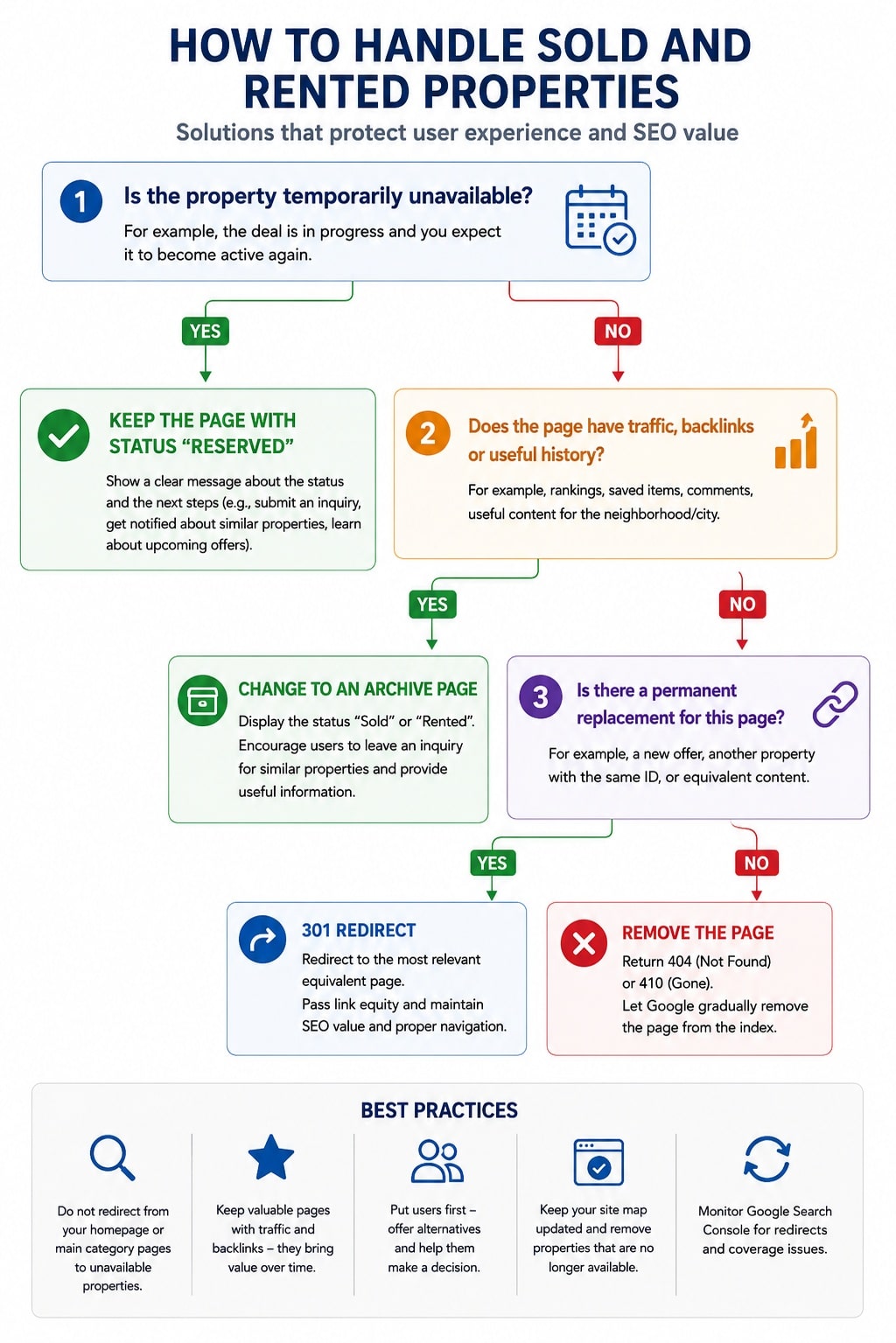
Automatically deleting every inactive listing is not a good universal rule. Keeping every old listing as if it were active is equally problematic.
Define status-specific behavior before launch.
If a transaction is not final or the property may return to the market, keep the page when permitted and show the real status clearly.
The main action should change. A request for an immediate showing may be replaced or supplemented with:
A page with traffic, external links, market-history value, or unique information about a building or community may remain as a clearly labeled historical record when data-display rights allow it.
It must not appear active. Any suggested alternatives should be genuinely similar in type, area, and practical use.
If the page has no continuing value and there is no equivalent destination, return a real 404 or 410 response.
Google recommends a permanent redirect only when content has actually moved to a relevant replacement. Its guidance on removed pages and redirects explains that a URL with no replacement should return 404 or 410 rather than redirecting users to an unrelated page.
Use a 301 redirect only when the replacement satisfies substantially the same user need. A sold two-bedroom condo should not automatically redirect to the homepage, a city page, or a random active listing.
Bulk redirects to irrelevant destinations create a confusing experience and can be treated as soft 404s.
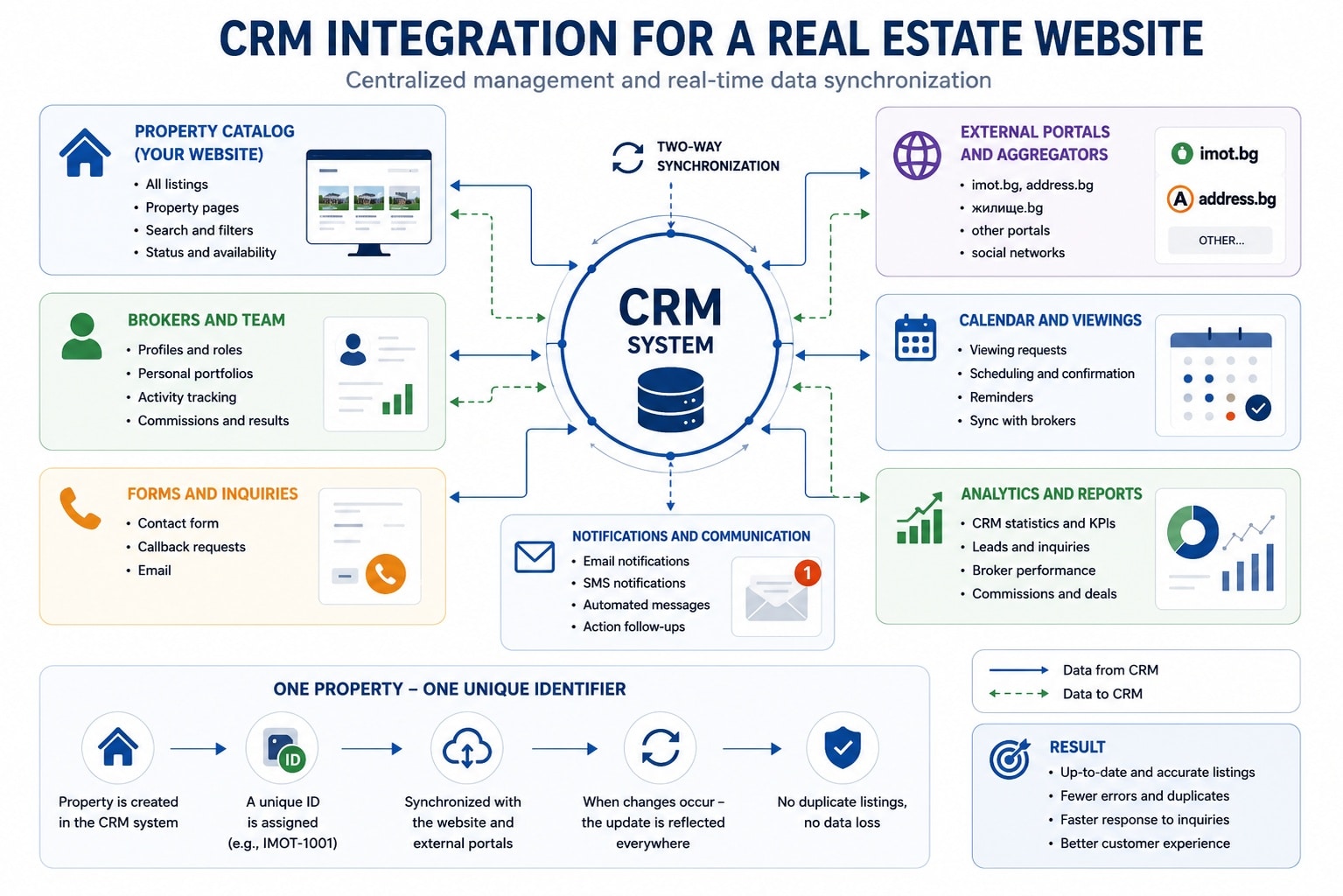
Maintaining listings manually in several systems leads to stale prices, wrong statuses, duplicate records, and missed inquiries.
A CRM or property-management integration may handle:
Before development, document:
The site must not create a new URL every time the same listing is imported. The stable source identifier should connect updates to the existing record.
Lead routing also needs a fallback. If an assigned agent leaves, is unavailable, or has incomplete CRM data, the inquiry still needs to reach a monitored team destination.
An agent page can build trust when it represents a real person and their actual role.
A useful profile may include:
Automatically generated pages containing only a name, phone number, and no active listings provide little value. If the team cannot maintain meaningful profiles, a strong team page may be better than many thin URLs.
When an agent leaves, decide whether the page should be updated, archived, redirected to a genuinely relevant team destination, or removed.
Location is both a property-search criterion and an SEO topic. That does not mean the site should automatically generate a page for every city, neighborhood, subdivision, and ZIP code.
A useful local page may include:
Do not describe a location by making unverified quality claims about schools, safety, demographics, or who a neighborhood is "ideal for." Use reliable sources, neutral wording, and a fair-housing review.
Pages that change only the city or neighborhood name do not demonstrate local expertise. They create a large set of similar pages that are difficult to maintain and rarely help users.
Brokerages with physical offices or defined service areas should connect the site with accurate business information, appropriate office pages, and a maintained Google Business Profile. This belongs within the brokerage's wider local SEO work.
Fair housing is not only a final legal review of the footer. It affects listing copy, neighborhood descriptions, search controls, lead forms, advertising, personalization, and automated recommendations.
HUD explains that the Fair Housing Act prohibits discrimination in housing-related activities based on protected characteristics under federal law. State and local protections may be broader.
The website planning process should include qualified legal and fair-housing review for:
Do not create filters or copy that directly or indirectly expresses a preference for a protected group. Do not allow agents, landlords, or portal users to publish unreviewed discriminatory wording.
This article provides website-planning information, not legal advice. The brokerage should confirm current federal, state, local, MLS, and licensing obligations with qualified professionals.
People need to browse listings, use filters, view media, and submit inquiries with different devices and assistive technologies.
The US Department of Justice provides guidance on web accessibility and the ADA and identifies common barriers such as low contrast, missing text alternatives, videos without captions, inaccessible forms, and mouse-only navigation.
Plan and test:
Automated accessibility testing is helpful but cannot replace manual and assistive-technology testing.
A visitor may like a property without being ready to call immediately. The site needs clear, nonintrusive next steps.
Useful actions may include:
On mobile devices, the primary contact method should be easy to reach. The screen should not be covered by multiple floating buttons, a chat widget, popups, and competing forms.
Each form should collect only the information needed for that action. A property inquiry should automatically carry the property ID, source URL, and assigned agent so the visitor does not have to re-enter them.
Set expectations after submission:
Analytics should reflect the brokerage's real business actions.
Useful events may include:
Raw form counts are not enough. The business should be able to identify:
Define privacy, consent, retention, and access rules for analytics and lead data before adding tags and integrations. US privacy obligations vary by state and business model, so current legal review may be required.
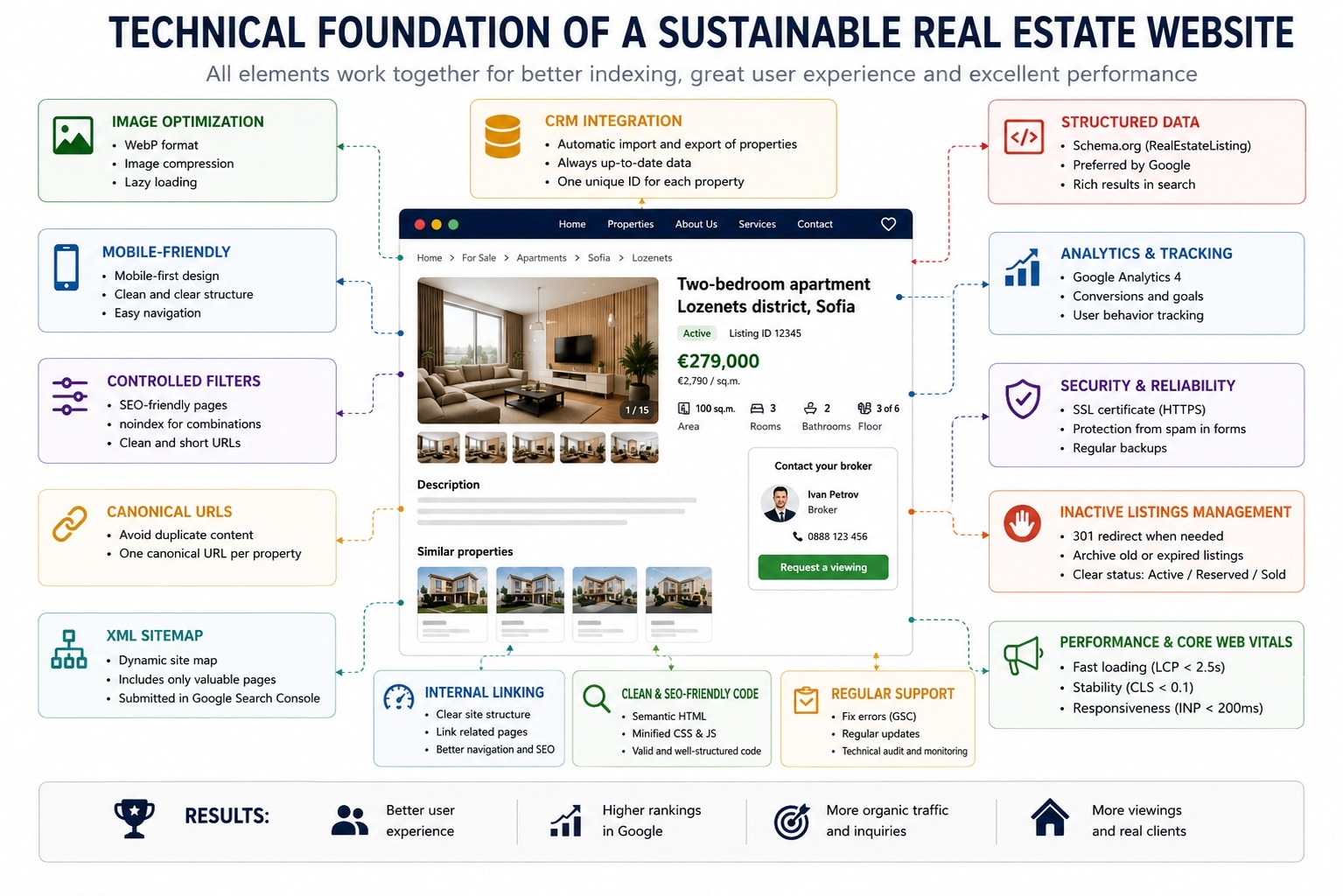
Real estate sites often begin with a modest number of pages and gradually accumulate photos, filters, maps, integrations, and inactive listings. The technical design must support that growth.
Large galleries, interactive maps, video tours, chat systems, and third-party listing widgets can make pages slow.
Plan performance budgets for:
Load noncritical media only when needed, but do not hide essential property information behind interactions that users or crawlers cannot access.
Core listing information should be available as text in the rendered page. It should not appear only after a complex search interaction.
The site should use crawlable links to important property-type, location, agent, and listing pages. Infinite scrolling needs stable paginated URLs or another crawlable discovery path.
XML sitemaps should contain the canonical URLs that the site wants search engines to discover. Google recommends fully qualified URLs and says sitemaps should generally include canonical URLs intended for search results in its sitemap documentation.
Do not automatically send empty filter pages, internal search results, unauthorized records, or every historical listing to Google.
Structured data can identify the organization, breadcrumbs, profile pages, articles, videos, and other supported entities when the visible content and page type qualify.
Do not assume that adding a Schema.org type for a real estate listing creates a special Google result. Google's structured data feature gallery lists the types that Google currently supports for enhanced search features.
Markup must match visible page information. Do not add false ratings, fabricated availability, hidden prices, or unsupported claims.
Forms need spam protection that does not create unnecessary barriers for real users. Administrative roles should limit who can publish, edit, export, or remove listings and lead data.
A portal with user-submitted content needs additional controls for:
Security updates, backups, access reviews, and integration monitoring are ongoing operational work, not one-time launch tasks.
A new real estate website can define its structure from the beginning. An existing site already has URLs, listings, rankings, internal links, lead sources, and possibly external backlinks.
Before a website redesign, collect:
An SEO audit before redesign helps determine which URLs remain, which pages merge, and which destinations are truly equivalent.
Do not change every property, location, and agent URL without a redirect and data-migration plan. A visually successful relaunch can still lose visibility, leads, and listing history if the URL and record relationships are broken.
There is no separate switch or special real estate markup that guarantees inclusion in AI Overviews, AI Mode, ChatGPT, or another generative system.
Google's guidance for AI features says the usual SEO fundamentals still apply and that no additional technical requirements or special AI schema are needed for AI Overviews or AI Mode.
A real estate website becomes easier to interpret when it provides:
Useful local expertise is more valuable than repeating the same keyword. Content should explain real decisions and reflect first-hand market knowledge.
Different real estate niches require different information models. Residential listing fields are not enough for an industrial property catalog.
For example, a company searching for warehouse, manufacturing, or logistics space may need to compare:
Those attributes should inform:
The practical rule is simple: fields and filters should match the decisions the customer makes. There is no universal property template that works equally well for residential, commercial, industrial, land, new construction, and property management.
A theme may look polished but fail to support the required listing data, MLS rules, filters, agents, lead routing, and lifecycle states. The functional specification should guide the design.
A feed is not the entire website strategy. Confirm data rights, fields, refresh rules, display requirements, URL control, performance, and integration options before committing to a vendor.
More URLs do not mean better SEO. Empty result pages and near-duplicate combinations consume maintenance and crawling resources.
Without lifecycle rules, the site fills with misleading active-looking properties, broken pages, or irrelevant redirects.
An outdated price, wrong status, missing attribution, or unavailable agent damages trust faster than the absence of a fashionable feature.
Identical MLS, CRM, or syndication copy does not build a distinct information resource. Priority listings and location pages need accurate, original context where the brokerage has something useful to add.
An empty profile or a city-name substitution does not demonstrate expertise.
Legal and accessibility reviews cannot be postponed until after templates, filters, copy, and targeting rules are fixed.
Several forms, chat widgets, popups, notification prompts, and floating buttons can obstruct the property content and compete with the main action.
Someone must be responsible for listing accuracy, agent information, local content, status changes, integration errors, and technical maintenance.
Before planning and building a professional website, confirm:
It needs a clear real estate-specific structure, individual property pages, reliable listing data, usable search and filters, current statuses, agent or brokerage contact information, accessible media, and clear ways to inquire. The exact fields and integrations depend on the business model and data source.
No. An individual agent or brokerage may use manually managed listings, brokerage-owned data, a CRM feed, IDX, or another approved source. The right choice depends on inventory, MLS eligibility, display permissions, update needs, and business goals.
No. Most combinations are useful only for the visitor's current search. Indexable pages should be limited to stable destinations with real demand, sufficient inventory, unique value, and a defined role.
Not automatically. A page with traffic, links, or useful historical context may remain when data rights allow and the sold status is unmistakable. A page with no value and no equivalent replacement may return 404 or 410. Redirect only to a genuinely equivalent destination.
Not always. A small inventory can be managed manually if one person owns accuracy and updates. As inventory, agents, and lead sources grow, integration can reduce duplicate entry, stale statuses, and routing errors.
Only as many as the brokerage can support with active inventory, genuine local expertise, and ongoing maintenance. Automatically generating a page for every neighborhood or ZIP code is not a sound strategy.
No separate AI markup is required. Useful text, accurate structured facts, crawlable pages, clear relationships, strong local expertise, and the standard technical SEO foundation remain the priorities.
During planning, before copy, filters, forms, personalization, templates, and vendor contracts are finalized. A late review may require expensive changes to both content and functionality.
The project does not end when the homepage is published. The real work begins when agents add listings, prices change, users apply filters, inquiries are routed, properties become unavailable, and the catalog grows.
Plan the website as a maintained business system, not a one-time design. When the property data model, operational responsibilities, listing lifecycle, lead process, and SEO rules are defined from the start, the business can grow its inventory and visibility without rebuilding the foundation for every new feature.