Logo
SEO & Pricing

HTTP Status Codes for SEO: Redirects, Deleted Pages, and Server Errors

Editorial illustration for HTTP Status Codes for SEO: Redirects, Deleted Pages, and Server Errors
Published on: 29/07/2026
Modified: 20/07/2026

When a page is moved, deleted, or temporarily unavailable, the website must give a clear response to both visitors and Google.

That response is communicated through an HTTP status code.

The problem is that a page may look completely normal in a browser while the server sends the wrong technical signal. The website owner sees one thing, while Google receives another.

Common examples include:

  • an old service URL redirects to the homepage instead of a real replacement;
  • a deleted product displays an empty template but returns 200 OK;
  • a permanent URL change uses a temporary redirect;
  • a website is in maintenance mode while every page returns 200;
  • important categories periodically return 500, 502, or 504;
  • a custom 404 page looks correct but technically returns 200;
  • several consecutive redirects slow access to the final page.

These errors can cause important URLs to disappear, invalid pages to be indexed, signals to be lost during a migration, and Google Search Console reports to become misleading.

The most useful question is not:

Which code is generally correct?

It is:

What is the real state of this URL, and what response should users and Google receive?

The essentials at a glance

Visual guide to the essentials at a glance
SituationAppropriate statusWhat it means
The page exists and works200The content is available
The URL moved permanently301 or 308Users and Google are sent to the permanent replacement
The move is temporary302 or 307The original URL remains the primary address
The page was removed without a replacement404 or 410The resource is no longer available
The website is temporarily under maintenance503The problem is temporary and the page should return
The server failed500, 502, or 504There is an application or infrastructure problem
Too many requests are being made429The server is temporarily limiting access
Access is protected401 or 403The resource is not publicly available

This is the core logic. More technical distinctions matter only after the real state of the URL has been defined.

Why an incorrect status is a business problem

The HTTP status affects how search engines understand the lifecycle of a page.

When the signal is wrong:

  • an important page may leave the index;
  • an old URL may continue to be crawled;
  • the new page may not receive the expected signals;
  • users may enter redirect loops or irrelevant pages;
  • Google may treat empty pages as soft 404s;
  • server errors may reduce crawling;
  • the XML sitemap may contain URLs that are no longer valid;
  • internal links may continue to pass through old addresses.

On a website with tens of thousands of products or filter combinations, one incorrect template setting can affect a very large group of URLs.

Systematic problems should not be repaired page by page. The template, module, application rule, or server configuration producing the response must be identified.

Scenario 1: You changed the URL of an important page

Visual guide to scenario 1: You changed the URL of an important page

Suppose a service page moved from:

/old-service/

to:

/new-service/

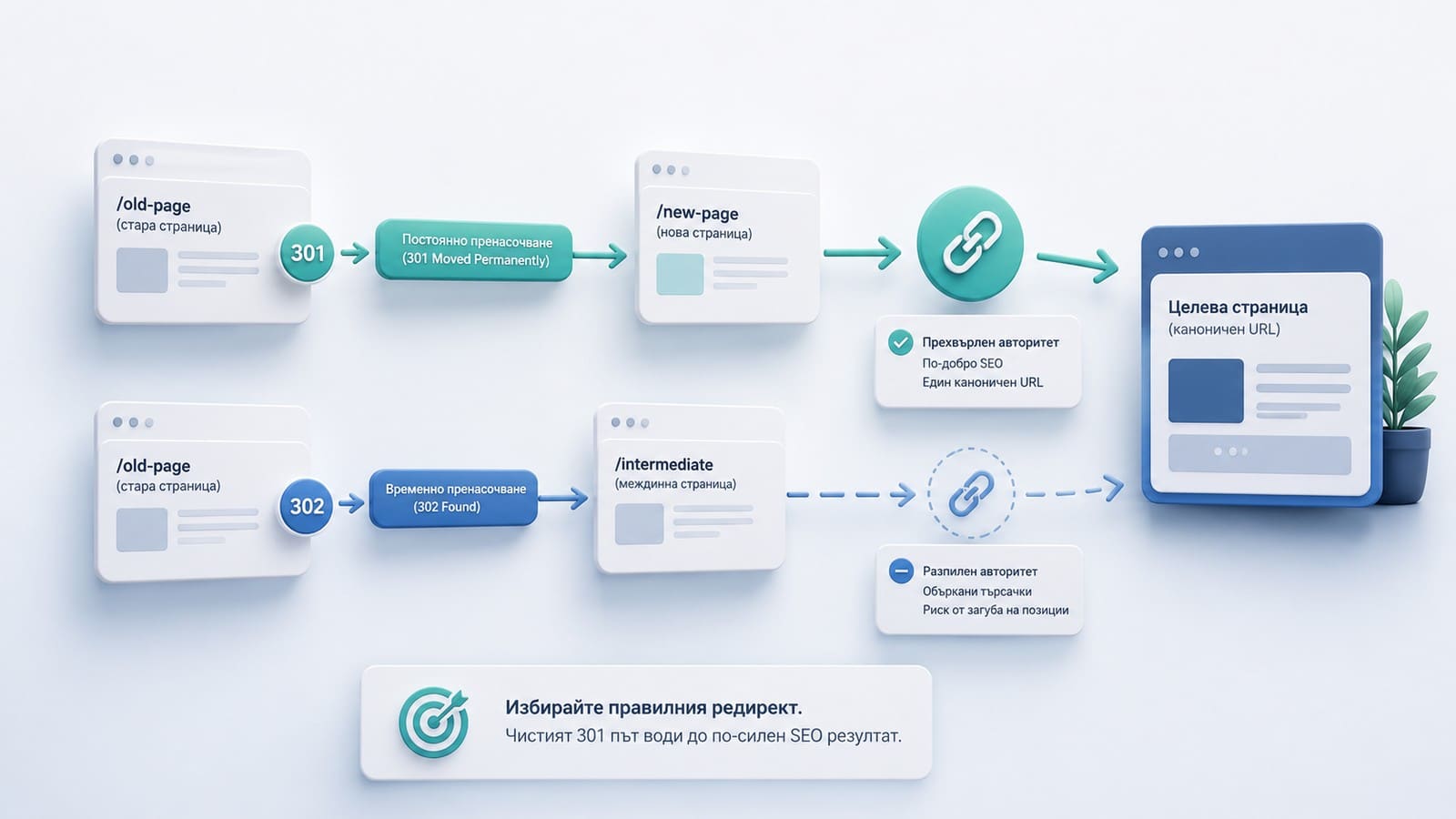
When the move is permanent, the old address should send users directly to the new one through a permanent redirect.

The common choice is 301. A 308 is also permanent and is particularly relevant when the request method must be preserved.

For a standard public page, confirm that:

  1. The old URL redirects directly to the new one.
  2. The new URL returns 200.
  3. There are no intermediate redirects.
  4. Internal links now point to the new URL.
  5. The XML sitemap contains only the new URL.
  6. The new page has a self-referencing canonical.
  7. The new page is a genuine topical and functional replacement.

Redirecting the old URL to the homepage only because the homepage is active is normally incorrect. When no relevant replacement exists, a 404 or 410 may be the more accurate response.

Google recommends server-side redirects when a URL moves permanently. See the official redirect documentation.

Scenario 2: You are merging two competing pages

When two pages serve the same intent, merging them may be the correct decision.

The process should include:

  • selecting one owner URL;
  • preserving the useful content on that owner;
  • redirecting the retired URL to the owner;
  • updating internal links;
  • removing the retired URL from the sitemap;
  • verifying the result on the live website.

A redirect should not be used automatically whenever two pages are vaguely similar. First confirm that they genuinely solve the same user problem.

Scenario 3: You deleted a page with no real replacement

Visual guide to scenario 3: You deleted a page with no real replacement

Not every 404 is an SEO problem.

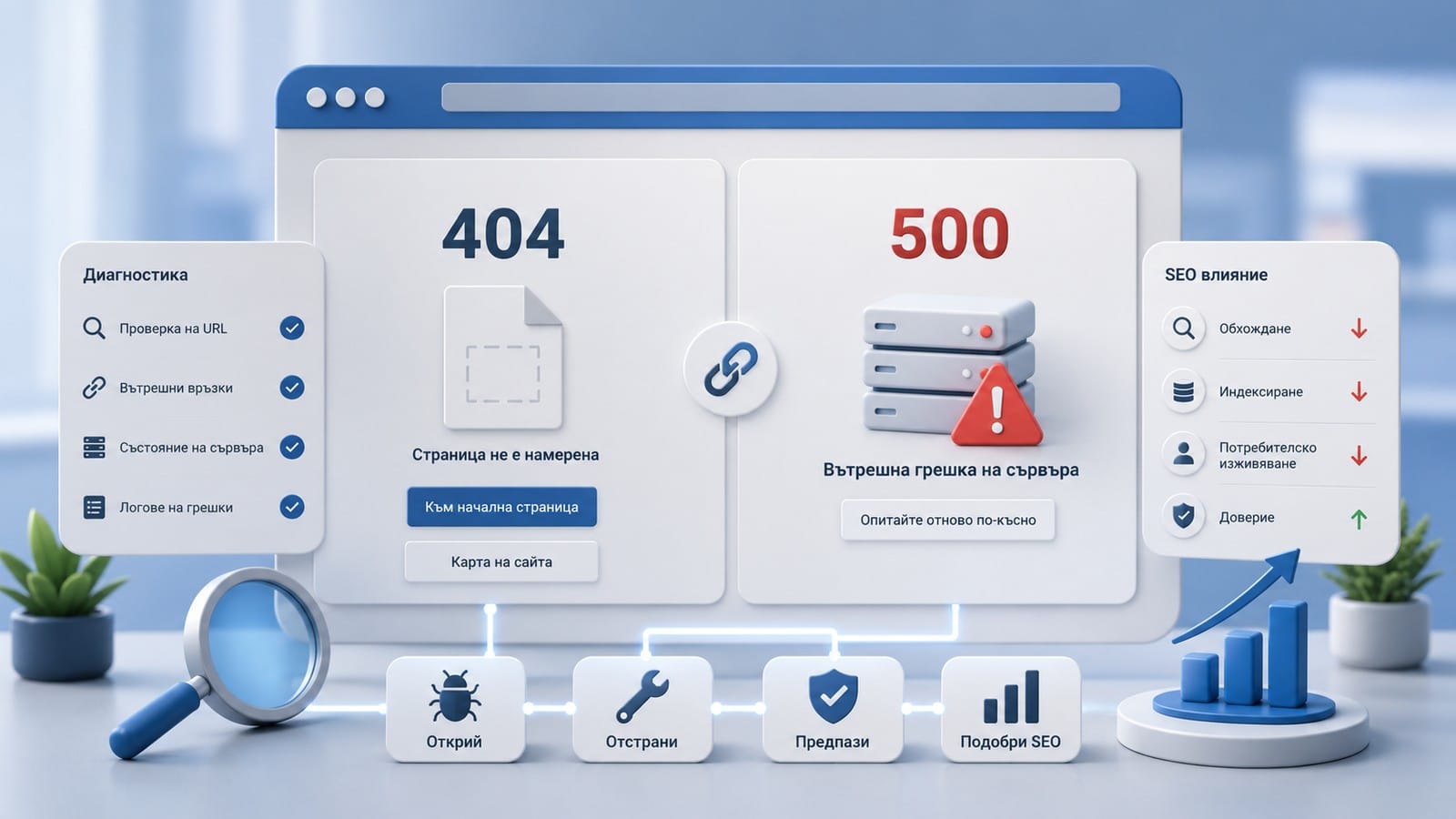
When a resource no longer exists and there is no relevant replacement, 404 is a normal and accurate response.

Examples include:

  • a mistyped URL;
  • a removed campaign;
  • an old file;
  • a product or listing that will not return;
  • a nonexistent profile or listing ID;
  • an old URL with no relevant new page.

410 Gone is a more specific signal that the resource was removed permanently. For Google Search, both 404 and 410 mean that the content is unavailable.

The important point is not to return 200 and not to use an irrelevant redirect.

What a useful 404 page should contain

A custom 404 page may include:

  • a clear message;
  • primary navigation;
  • search;
  • links to important categories or services;
  • a way to return to the previous step.

Its technical response must still be 404.

A helpful design does not turn a missing resource into a valid 200 page.

Scenario 4: The page looks like an error but returns 200

This is a common soft 404 situation.

The server says:

The page exists and loaded successfully.

The content says:

No such page, product, or result exists.

Common examples include:

  • a deleted product with an empty template;
  • a page displaying "No results found";
  • an SPA route that visually displays a 404 screen;
  • a nonexistent URL that loads the homepage without a redirect;
  • an empty category;
  • an automatically generated profile URL with no real profile.

Soft 404s can lead to:

  • crawling of unnecessary URLs;
  • indexing of empty or useless templates;
  • inaccurate monitoring reports;
  • accumulated content debt.

The correction depends on the real state:

  • the resource exists - return complete content with 200;
  • it moved - use a permanent redirect;
  • it was removed without a replacement - return 404 or 410;
  • it is temporarily unavailable - use an appropriate 5xx;
  • access is protected - use correct access control.

Do not add arbitrary filler text merely to make a template look complete. The status and content must describe the same reality.

Scenario 5: The change is temporary

A temporary redirect is appropriate when the original URL remains the primary address and the redirect will later be removed.

Common codes are 302 and 307.

Examples include:

  • a temporary landing page;
  • a short-term operational change;
  • a temporary routing decision;
  • a controlled A/B implementation;
  • a temporary redirect to an informational notice.

307 preserves the request method. For a standard GET page, the distinction is often not important to the website owner.

The key question is whether the change is genuinely temporary.

Do not use 302 for a permanent migration simply because the CMS creates it by default.

Scenario 6: The website is temporarily under maintenance

Visual guide to scenario 6: The website is temporarily under maintenance

When a website or important section is temporarily unavailable, the appropriate status is normally 503 Service Unavailable.

Example:

HTTP/1.1 503 Service Unavailable
Retry-After: 3600

Users may see a normal maintenance page with an explanation. The server should still communicate that the condition is temporary.

Why 200 is wrong during maintenance

If every URL returns the same maintenance page with 200, Google may process it as normal content.

This creates a risk of:

  • duplicate maintenance pages;
  • soft 404 classification;
  • temporary replacement of titles and content;
  • misleading Search Console reports;
  • loss of the normal page output during crawling.

Why 503 should not remain for too long

503 is a temporary signal.

When it persists:

  • Google may reduce crawling;
  • important URLs may gradually leave the index;
  • users continue to experience an outage;
  • monitoring systems report a prolonged failure.

After maintenance, verify the live responses of critical URLs.

Scenario 7: The website periodically returns server errors

Codes such as 500, 502, and 504 represent different application or infrastructure failures. For a website owner, the most important questions are scope and duration.

Determine whether the error:

  • is isolated;
  • affects one template;
  • affects the entire website;
  • appears under high load;
  • is connected to a deployment;
  • affects important money pages;
  • produces a different response for Googlebot;
  • follows a repeated pattern in server logs.

500 Internal Server Error

This normally indicates an application failure, such as:

  • a PHP fatal error;
  • database failure;
  • plugin conflict;
  • memory exhaustion;
  • template crash;
  • deployment error.

502 Bad Gateway

This often indicates a problem between a proxy or gateway and the application server.

504 Gateway Timeout

This means an intermediate server did not receive a timely response. The cause may be a slow database query, an overloaded backend, or an external dependency.

One short-lived error does not automatically cause permanent SEO damage. Repeated and prolonged failures are the real risk.

Google states that 5xx and 429 responses may temporarily reduce crawling. Persistent server errors can eventually cause URLs to be removed from the index.

Scenario 8: Website security blocks Googlebot

401 and 403 are normal for private resources, but they are a problem when they appear on public pages.

Possible causes include:

  • a WAF rule;
  • bot protection;
  • IP restrictions;
  • a hosting firewall;
  • geographic restrictions;
  • incorrect file permissions;
  • overly aggressive rate limiting.

Do not assume that Google has an access problem without checking security and hosting logs.

Do not whitelist a crawler based only on its user-agent string. Verify genuine Googlebot requests through the official verification method.

Redirect chains and loops

Redirect chain

A chain occurs when an old URL redirects to an intermediate address, which redirects again:

/old-url/ -> /old-target/ -> /new-target/ -> /final-url/

The practical target should be:

/old-url/ -> /final-url/

Chains create:

  • additional server requests;
  • slower access;
  • a higher timeout risk;
  • accumulated legacy rules;
  • more difficult diagnosis;
  • outdated internal links.

Redirect loop

A loop occurs when URLs redirect cyclically:

/a/ -> /b/ -> /a/

Common causes include conflicts between:

  • WordPress;
  • hosting settings;
  • HTTPS rules;
  • a language plugin;
  • trailing-slash rules;
  • an application router;
  • cache.

A loop makes the page inaccessible and should be treated as a critical problem.

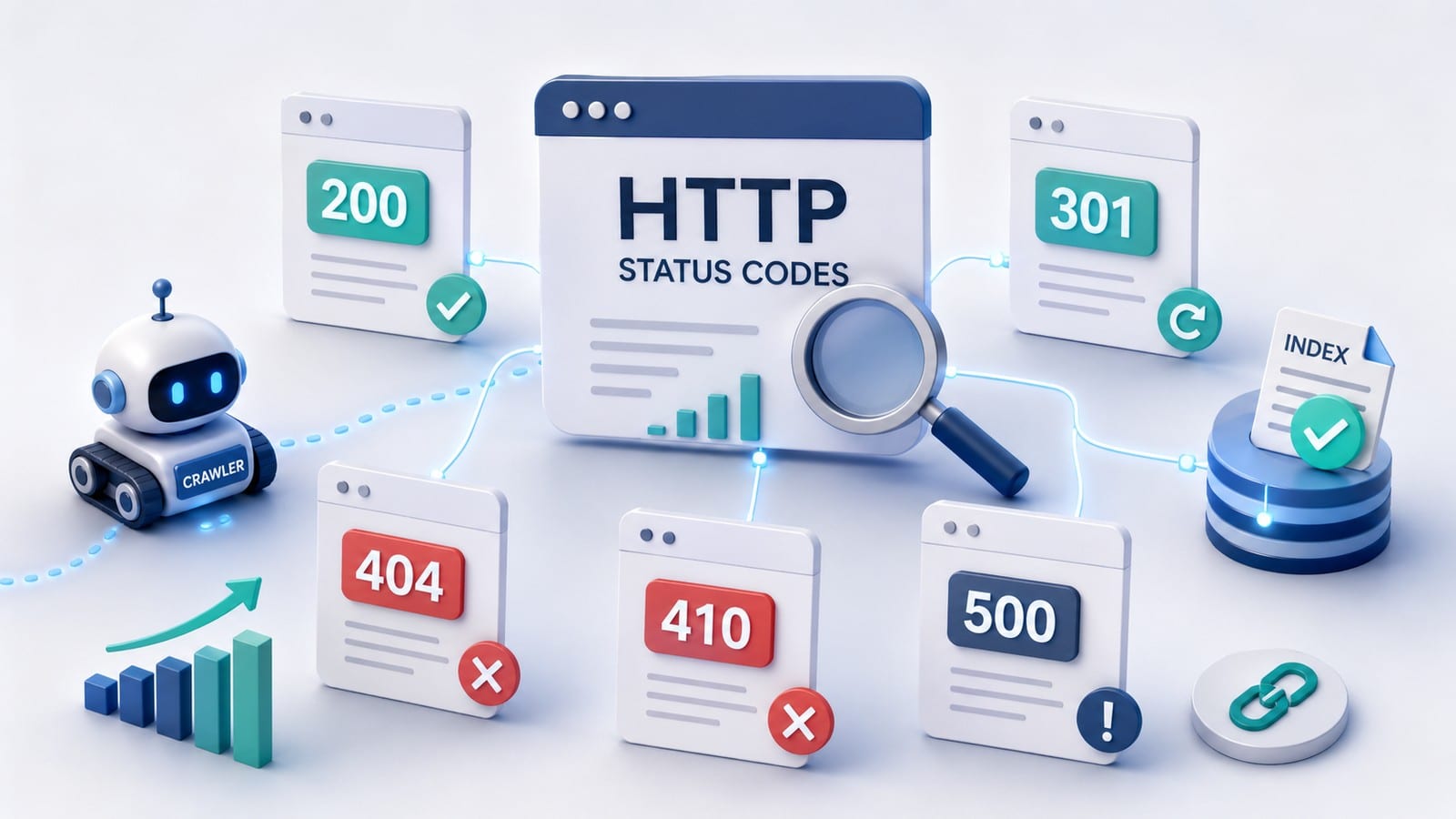
What the main status-code groups mean

Most website owners do not need to memorize every HTTP code. Understanding the five groups is sufficient:

GroupMeaning
1xxIntermediate information about the request
2xxThe request was completed successfully
3xxRedirection is required
4xxThe resource is missing or access is restricted
5xxThe server cannot complete the request

The most common SEO decisions involve 200, 301, 302, 404, 410, 429, 500, and 503.

Google provides an official explanation of how HTTP status codes affect crawlers.

200 OK does not guarantee indexing

200 means that the request was processed successfully and content was returned.

It does not mean that Google must index the page.

Reasons may include:

  • duplicate content;
  • selection of another canonical URL;
  • insufficient independent value;
  • weak intent match;
  • noindex;
  • rendering problems;
  • missing internal links;
  • soft 404 content.

The status code describes the server response. It does not evaluate the quality or usefulness of the page.

How to check the real status

Do not rely only on what appears in the browser window. Browsers follow redirects automatically and often display only the final page.

Browser developer tools

In the Network panel, inspect:

  • the initial document request;
  • status code;
  • redirect sequence;
  • Location header;
  • final URL;
  • response headers;
  • failed resources.

Command line

To inspect the main headers:

curl -I https://example.com/page/

To trace redirects:

curl -I -L --max-redirs 10 https://example.com/old-page/

Also test a normal GET request because some server configurations process HEAD requests differently.

Site-wide crawler

A crawler can identify:

  • internal links pointing to 3xx;
  • 4xx destinations;
  • 5xx pages;
  • redirect chains;
  • loops;
  • possible soft 404s;
  • sitemap URLs with incorrect responses.

Server logs

Logs show what Googlebot actually receives, including:

  • frequency of 5xx and 429;
  • templates with repeated errors;
  • old redirects that are still crawled;
  • Googlebot requests to 404 URLs;
  • different responses by user agent.

Google Search Console

Search Console may report:

  • soft 404s;
  • not found 404;
  • server error 5xx;
  • redirect issues;
  • last crawl;
  • URL Inspection results.

Search Console does not replace a live HTTP check. Its data may reflect an earlier crawl.

Status, sitemap, canonical, and internal links must agree

A correct URL system communicates consistent signals.

For an active page:

  • the URL returns 200;
  • canonical points to the same owner URL;
  • the sitemap includes that URL;
  • internal links point directly to it.

For a moved page:

  • the old URL returns a permanent redirect;
  • the redirect target returns 200;
  • the sitemap contains the target;
  • internal links are updated;
  • there is no chain.

For a removed page with no replacement:

  • the URL returns 404 or 410;
  • it is excluded from the sitemap;
  • internal links are removed or corrected.

Canonical is not a substitute for a redirect. Noindex is not a substitute for 404. A homepage redirect is not a substitute for a lifecycle decision.

How to prioritize problems

PriorityExampleWhy it matters
CriticalSite-wide 5xx, redirect loop, prolonged 503Blocks a large part of the website
HighMoney page returning 404, permanent migration using 302, widespread soft 404sAffects important URL owners or large page groups
MediumRedirect chains, sitemap containing 3xx, intermittent 502Creates accumulating technical risk
LowOne external typo URL with no linksLimited real impact

Priority is not determined by the code alone. Also consider:

  • the number of affected URLs;
  • business role;
  • traffic;
  • internal and external links;
  • duration;
  • template scope;
  • probability of recurrence.

Practical checklist for website owners

  • [ ] Important pages return a real 200.
  • [ ] Deleted pages without a replacement return 404 or 410.
  • [ ] Permanently moved URLs use 301 or 308.
  • [ ] Temporary moves use 302 or 307.
  • [ ] Redirect targets are genuine replacements.
  • [ ] There are no homepage redirects without a topical reason.
  • [ ] There are no chains or loops.
  • [ ] Internal links point directly to final URLs.
  • [ ] The sitemap contains no 3xx, 4xx, or 5xx.
  • [ ] The custom 404 page returns 404, not 200.
  • [ ] Maintenance mode returns 503.
  • [ ] The 503 response is removed after maintenance.
  • [ ] Repeated 5xx errors are investigated in server logs.
  • [ ] The security layer does not block public pages for Googlebot.
  • [ ] SPA routes return the correct status.
  • [ ] Cache is not serving an old redirect or error response.

For seo-webdesign.bg, WP Rocket is the caching plugin and there is no CDN. After changes, inspect the live response and account for WP Rocket cache without assuming an external CDN layer.

Frequently asked questions

Should every 404 page be redirected?

No. A redirect is appropriate only when a real and relevant replacement exists. Without one, an accurate 404 or 410 is better than a redirect to the homepage or an unrelated category.

Is 410 better than 404?

410 is a more specific signal for a permanently removed resource. For Google, both statuses mean that the content is unavailable. There is no need to replace every 404 with 410.

Which is better for SEO, 301 or 308?

Google treats both as permanent redirects. For standard web pages, 301 is more common. 308 matters when the request method must be preserved.

Which is better, 302 or 307?

Both are temporary redirects. 307 preserves the request method. For a standard GET page, the choice is normally operational rather than an SEO shortcut.

Does 200 guarantee that a page will be indexed?

No. 200 means that content was returned successfully. Google may still exclude the page because of duplicate content, canonical selection, noindex, rendering problems, or insufficient value.

Can a maintenance page return 200?

It can technically return 200, but that is the wrong signal. Use 503 when a website is temporarily unavailable.

Do server errors affect SEO?

Yes, when they are prolonged or systematic. Google may reduce crawling, and important URLs may gradually leave the index.

When an SEO audit is needed

One incorrect redirect may be easy to repair. A systematic problem requires broader evidence.

A complete technical SEO audit is appropriate when:

  • many URLs return incorrect status codes;
  • redirects are created by several system layers;
  • Search Console shows increasing soft 404s or 5xx;
  • sitemap and live responses do not agree;
  • SPA routes return 200 for nonexistent pages;
  • a WAF or hosting protection blocks crawlers;
  • the issue affects templates rather than individual pages;
  • a migration or large URL change is planned.

The audit should connect crawl data, server logs, Search Console, sitemap, redirects, canonical signals, and the real business state of each URL group.

When implementation and follow-up monitoring are required, SEO optimization covers the prioritized changes and verifies the result after recrawling.

Practical takeaway

HTTP status codes are not a list of numbers that a website owner must memorize.

They are the website's way of stating clearly:

  • this page exists;
  • it moved;
  • it is missing;
  • it is temporarily unavailable;
  • access is restricted.

The most dangerous situations are mismatches between the status, content, and real state.

An error page returning 200, a permanent migration using 302, a maintenance page returning 200, or an irrelevant homepage redirect hides the problem instead of solving it.

A useful review starts with the business decision for the URL and ends with live evidence that the server response, content, sitemap, canonical, and internal links work as one system.

Official sources

Гласувай
crosschevron-down