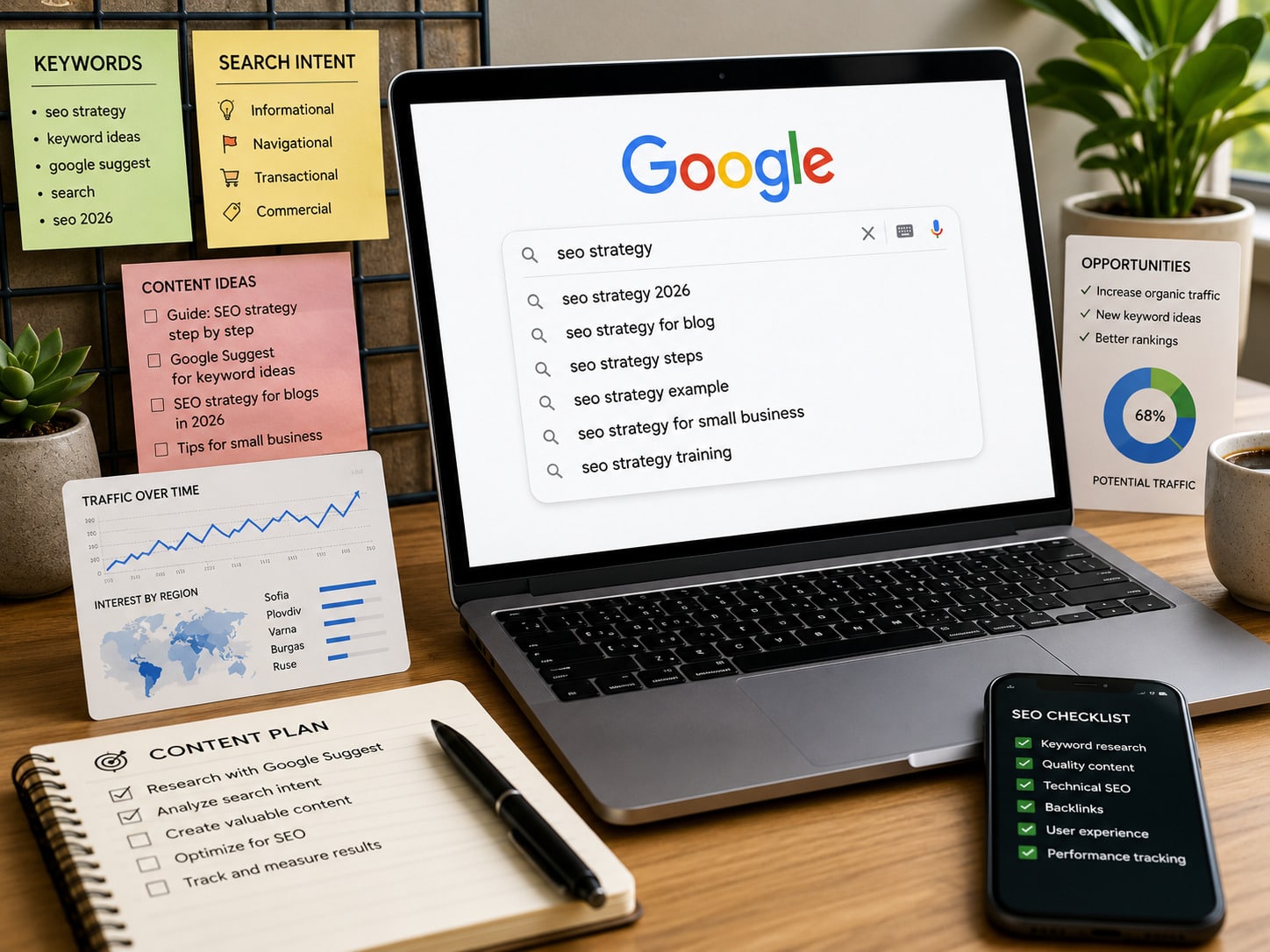
Google Autocomplete is the feature that predicts how a search may continue while someone types in the Google search box. It is also widely known as Google Suggest.
For SEO research, Autocomplete can expose the exact words people use, common modifiers, local variations, product attributes, comparisons, and questions. It is a discovery source, not a complete keyword database. A prediction is not proof of monthly search volume, a ranking opportunity, or a specific search intent.
The useful workflow is simple: collect relevant predictions, preserve their context, validate them with other data, review the actual search results, and only then decide whether they belong in an existing page, a supporting section, or no page at all.
Google Autocomplete can support a broader SEO optimization process, but it should never replace market knowledge, first-party data, or a structured content plan.
Google Autocomplete is a Search feature designed to help users complete a query faster. When a person begins typing, Google's automated systems display possible completions based on the entered characters and other signals.
Google calls them predictions because the feature tries to complete the search a person may already intend to make. It is not a list of topics Google recommends, endorses, or confirms as true.
Autocomplete may appear in several Google search surfaces, including:
The presentation can differ by device, interface, account, language, and market. The list you see today may also change as search activity and current events change.
In everyday SEO language, Google Suggest and Google Autocomplete usually refer to the same prediction feature. "Google Autocomplete" is the current product name used in Google's documentation.
Google Instant was different. It was an older feature that updated search results while a user was still typing. It should not be presented as a current part of Autocomplete. Modern keyword research should focus on current Autocomplete predictions and the current search results shown after a query is submitted.
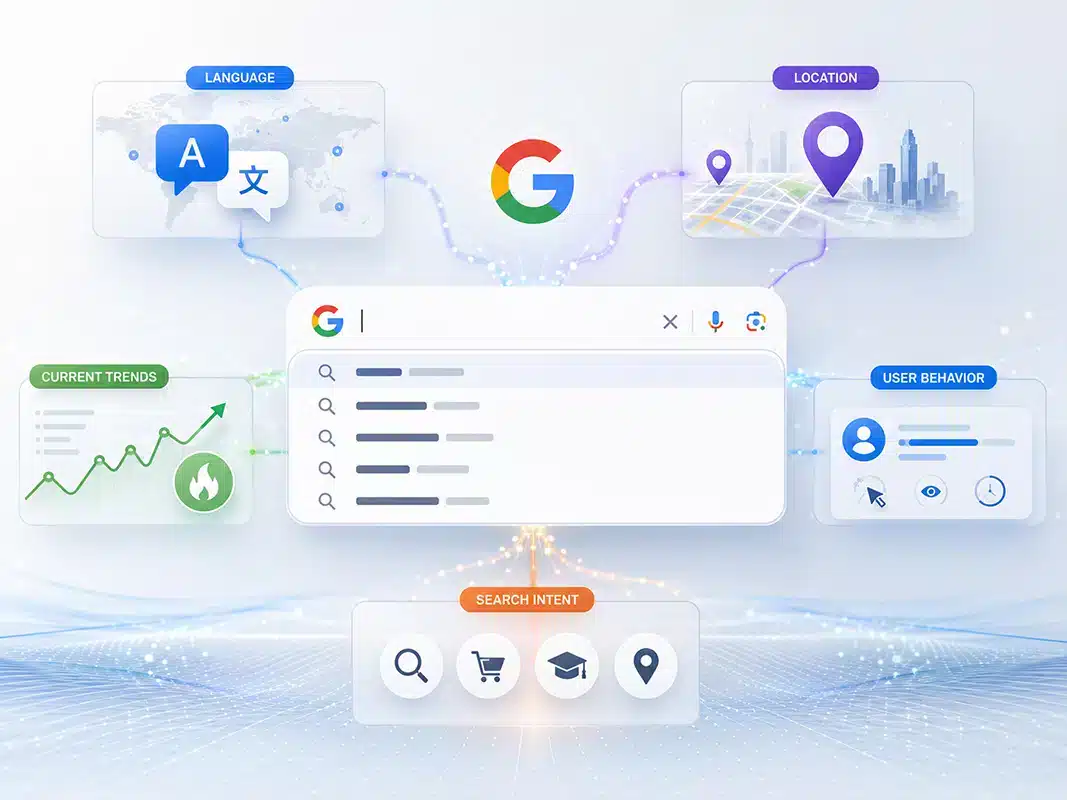
According to Google's official explanation of Autocomplete predictions, predictions reflect real searches and word patterns, but they are selected by automated systems rather than copied from a simple popularity list.
Google states that its systems look for common queries that match what a person has started to type. They can also consider:
These signals help explain why two people can receive different predictions for the same opening words.
Language changes vocabulary, spelling, syntax, and meaning. A query entered in English may produce different predictions from its Bulgarian translation even when both refer to the same product or service.
For international SEO, research each target language directly. Do not translate an English prediction list and assume that it represents how another market searches.
Location can affect which predictions are useful. A broad service query may surface city names, neighborhood names, "near me" wording, regional terminology, or locally important brands.
This makes Autocomplete useful for discovering local phrasing. It does not mean every location modifier deserves a separate landing page.
Predictions can respond to recent events, product launches, seasonal demand, public announcements, and sudden changes in interest.
A new prediction may identify a timely question before it appears prominently in slower-moving keyword databases. It may also disappear after the event passes. Time-sensitive findings therefore need a date, location, and follow-up check.
Google may use a person's previous searches or other account activity to make predictions more useful to that person.
For research, this means one browser session is not a neutral market sample. Signed-in history can influence the list. A private browsing window can reduce some personal context, but it does not remove location, language, device, or all other variables.
Autocomplete often reflects queries that have been searched before, but Google also says it may predict individual words and phrases from patterns found across the web.
This is one reason a visible completion should not be treated as an exact record of how many people searched for the full phrase.
Autocomplete is easy to access, which makes it easy to overinterpret. It does not provide several data points that an SEO decision normally requires.
The order of predictions is not a volume report. A phrase shown first is not necessarily the most searched phrase in a market.
Google explicitly distinguishes Autocomplete from Google Trends and states that Autocomplete does not simply display the most popular queries for a topic.
Use Google Ads Keyword Planner or another suitable keyword data source when you need volume estimates. Use Google Trends when you need relative interest over time. Use Google Search Console when you need first-party query data for a website that already appears in Search.
A prediction provides wording, not a complete explanation of what the searcher expects.
For example, a phrase containing "best" may lead to comparison pages, product pages, local results, videos, or a mix of formats. The actual results page must be reviewed before intent is assigned.
Search intent classification is a separate analysis. This guide uses Autocomplete to discover candidate queries and stops before the full intent framework.
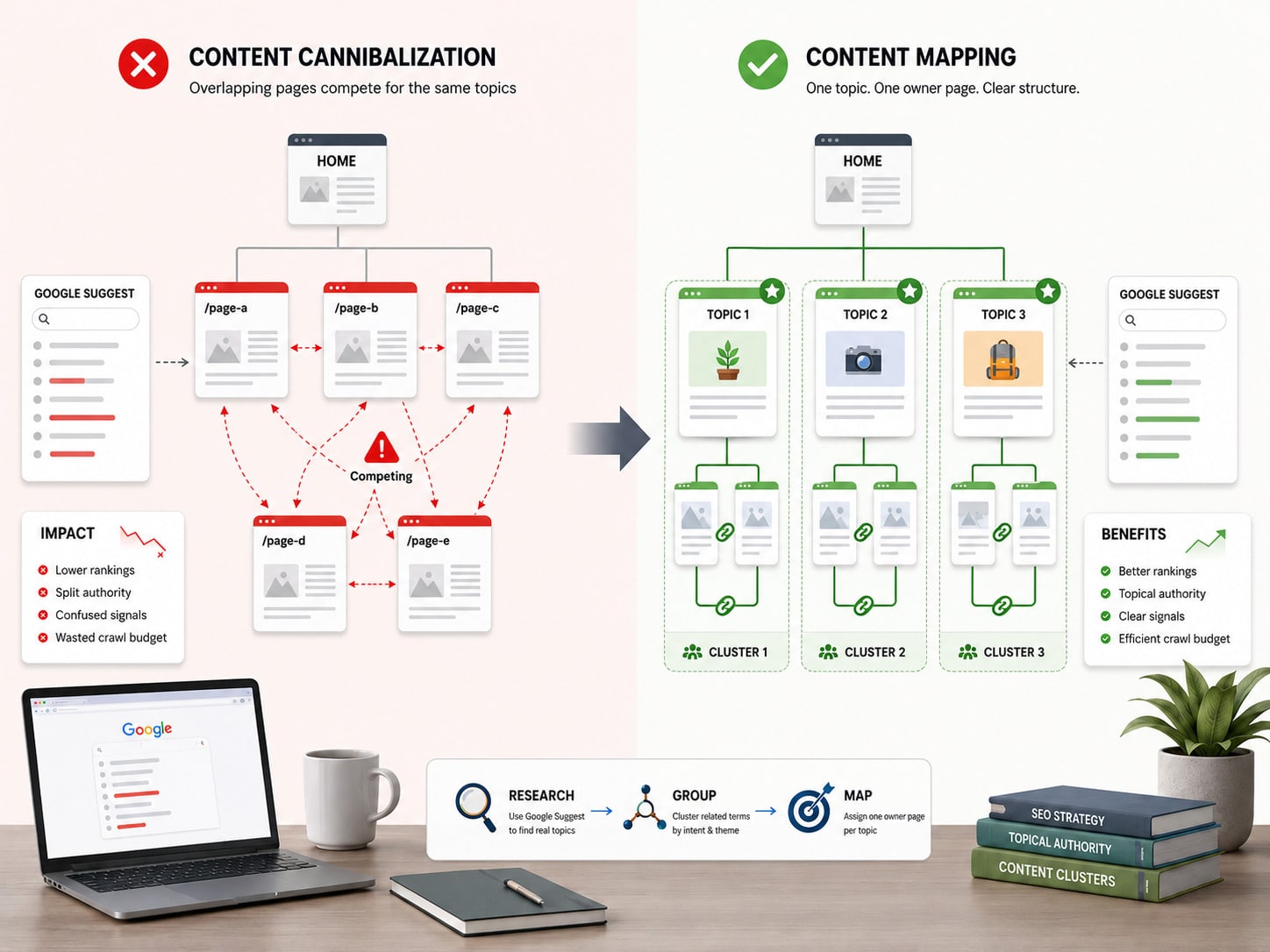
One visible prediction does not justify one new URL.
Several related queries may belong to:
Keyword-to-URL mapping belongs to the site's wider topical and architectural plan. Creating a page for every prediction can produce thin content, duplicate intent, and keyword cannibalization.
Predictions can change because of news, seasonality, location, policy enforcement, or shifts in search behavior.
Record when and where a prediction was collected. Recheck important terms before committing resources to new content.
Predictions are generated automatically. They are not statements of fact and do not represent Google's opinion.
This matters when a prediction includes an accusation, a medical claim, a political statement, or a negative phrase attached to a person or brand.
Google uses systems and policies to prevent certain predictions from appearing. Current policy areas include dangerous content, harassment, hateful content, sexually explicit content, terrorism, violence, and vulgar language. Google also applies feature-specific rules to areas such as elections, health, sensitive terms about named individuals, and serious allegations without reliable support.
The absence of a prediction does not prove that nobody searches for the phrase. Policy filters, low activity, insufficient data, wording differences, or other system decisions can prevent it from appearing.
Likewise, removing an Autocomplete prediction does not remove search results for a fully typed query. Autocomplete and the search results index are separate systems.
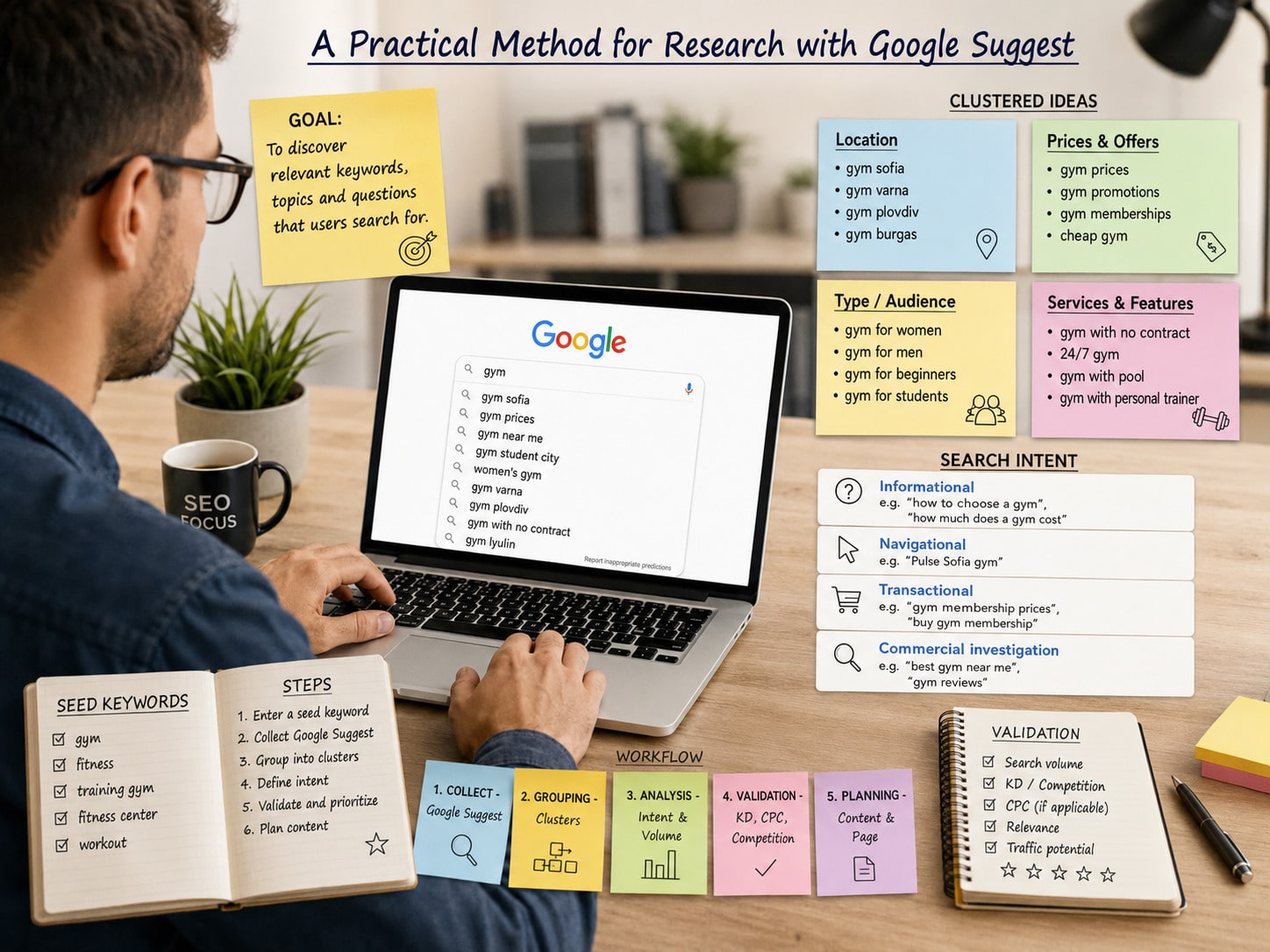
The following workflow keeps Autocomplete in its proper role: discovery first, validation second, content decisions last.
Start with a clear business, audience, market, and language.
Instead of researching the broad seed "software," define a narrower scope such as:
A narrow scope reduces irrelevant predictions and makes later decisions easier.
Document:
Seed terms are the starting phrases entered into Google. Useful seeds may come from:
Use both expert terminology and the simpler language customers use. A buyer may describe the same problem differently from a product team.
Set the correct language and location as closely as the research allows. Record whether the session is signed in and which device or interface was used.
For a less personalized review:
This does not create a perfectly neutral result. It simply makes the process easier to repeat and compare.
Use modifiers that reflect real stages of research rather than random letter combinations alone.
Useful modifier groups include:
| Modifier group | Examples |
|---|---|
| Questions | what, why, how, when, can, does |
| Evaluation | best, top, reviews, worth it |
| Comparison | vs, alternative, compare |
| Cost | cost, price, pricing, quote |
| Audience | for small business, for beginners, for teams |
| Location | near me, city, state, service area |
| Problems | not working, error, slow, failed |
| Attributes | size, material, model, feature |
| Timing | 2026, today, seasonal wording |
Also test words before and after the main seed. "CRM for" can reveal a different set of needs from "best CRM."
Alphabet expansion can uncover more phrasing, but it should be a secondary technique. The goal is not to produce the longest possible list. The goal is to find relevant language that can be validated.
For each useful prediction, record:
This context prevents a team from treating an old screenshot as permanent demand.
Delete or set aside predictions that are:
Filtering early keeps the next stages focused.
No single keyword source answers every question.
| Source | Best use | Main limitation |
|---|---|---|
| Google Autocomplete | Discover exact wording, modifiers, and emerging questions | No exact volume or complete list |
| Google Trends | Compare relative interest, direction, seasonality, and regions | Uses normalized sampled data, not absolute volume |
| Google Ads Keyword Planner | Find related terms and review volume estimates and forecasts | Built for advertising and may group or limit data |
| Google Search Console | See queries for which your own site already receives impressions or clicks | Limited to your site's existing visibility |
| Sales and support data | Identify real customer language, objections, and problems | May reflect a small or biased customer sample |
Google's Keyword Planner documentation explains that the tool can discover related keywords and provide search estimates. Google's Trends data documentation explains that Trends uses a normalized sample of searches and should be interpreted as one data point among several.
Use at least two relevant sources before making a significant content investment.
Search the candidate phrase and inspect the results that Google currently returns in the target market.
Check:
This is the point where a candidate phrase moves from a discovery list into intent analysis. Autocomplete itself does not make that decision.
Combine close variants when the same page and answer can satisfy them.
For example, these phrases may belong to one useful section rather than three separate articles:
Do not group phrases only because they share words. If the results show different expectations, they may need separate treatment.
The final assignment of query groups to URLs is part of the broader content architecture. Check existing owners before creating anything new.
Use validated predictions to improve a page only when they add information for the reader.
Possible actions include:
Do not paste a prediction list into an article and call it optimization. The page still needs accurate, original, complete information.
Imagine a company that installs commercial solar systems in the United States. The research scope is not the broad word "solar." It is commercial solar installation for business owners.
Possible seeds include:
Autocomplete may reveal modifiers related to financing, roof requirements, payback periods, tax questions, installation time, and maintenance.
The team should not immediately create one page for every completion. It should:
The value of Autocomplete is that it reveals language and possible demand. The value of the complete process is that it prevents those clues from becoming unnecessary URLs.
Autocomplete can reveal how people combine a service with:
Local predictions can help refine copy on a legitimate location or service-area page. They do not justify doorway pages for every nearby city.
Before using a local modifier, confirm that the business actually serves the location and that the page can provide unique, useful local information.
International research must be performed separately for each language and market.
Account for:
A direct translation can be grammatically correct and still fail to match how people search.
Website optimization does not provide a direct control for adding, deleting, or ordering predictions.
Search behavior, current interest, language, location, past searches, automated systems, and policies all affect the output. A company should not promise that SEO can place a preferred phrase in Autocomplete.
Attempts to manufacture searches or manipulate predictions are unreliable and can create reputational, ethical, and platform risks. Focus on legitimate demand, clear brand communication, customer satisfaction, and useful content.
Over time, successful products, campaigns, news coverage, and customer interest may change how people search for a brand. That is an outcome of real market behavior, not an Autocomplete setting.
A negative prediction should be investigated carefully, not treated as proof.
Record:
Check whether the phrase is a personal past search or appears more broadly.
Review the search results, customer feedback, support records, news coverage, and other reliable evidence.
If the phrase reflects a real customer problem, address the problem and publish accurate information where appropriate. Reputation work should begin with the underlying cause.
Google provides a way to report predictions that may violate its policies. Reporting does not guarantee removal, and a company cannot directly edit the list.
Do not organize artificial searches in an attempt to push a phrase up or down. It is not a responsible reputation strategy.
Prediction order depends on more than popularity. Use a volume source when volume matters.
Past searches can shape predictions. Document the session and repeat important checks in a less personalized context.
A list collected in one country or language cannot automatically represent another market.
Closely related phrases often share the same need. Check ownership and the actual search results before adding a page.
Autocomplete is strongest at discovery. It needs validation through trends, estimates, first-party data, and manual result review.
Adding a phrase to a heading does not make the content useful. The answer must be accurate, specific, and complete.
Policies, low activity, wording, and system decisions can all affect visibility.
Predictions may be inaccurate, unexpected, or offensive. Verify claims independently.
Before using a prediction in an SEO plan, confirm:
Yes, in common SEO usage both names usually refer to the prediction list shown while a person types. Google Autocomplete is the current name used in Google's documentation.
Not necessarily. Google considers common queries, but predictions can also vary with language, location, trending interest, past searches, policies, and word patterns. The order is not an exact popularity ranking.
No. It does not provide monthly search counts. Use Keyword Planner or another volume source for estimates, and Google Trends for relative interest over time.
Yes. It is useful for discovering wording, modifiers, questions, and emerging topics. Validate important phrases before deciding what content to create or update.
Language, location, past searches, account activity, device, interface, current events, and changing search behavior can all contribute to different lists.
No. Many predictions share the same need, belong on an existing page, or are irrelevant to the business. Review the results and the site's current ownership before creating a URL.
There is no SEO control that directly deletes a prediction. Investigate the underlying issue and use Google's reporting option when a prediction may violate policy.
Repeat it when customer needs change, before major content planning, during seasonal research, after a product launch, and when a fast-moving topic is important. Record dates so changes can be compared.
Google Autocomplete is valuable because it exposes query language at the moment a person begins searching. It can uncover modifiers, questions, local variations, comparisons, and new areas of interest quickly.
Its limits are just as important. It is not a search volume report, an intent classifier, a content map, or a direct reputation control.
Use it to discover possibilities. Validate those possibilities with the right data. Review the real search results. Then make content decisions within the site's established ownership and architecture.
At SeoWebDesign, our SEO team combines keyword discovery with first-party data, result analysis, content ownership, and technical review so that research leads to useful pages instead of an inflated URL list.